How to Add Music to Instagram Stories on PC
Add trending Instagram tracks, royalty-free music, or your own MP3s to Stories, Reels, and posts directly from your desktop.

Ethan Campbell
Published 12 Apr 2026

Instagram's web interface and third-party scheduling tools don't support adding music because the API doesn't allow audio attachments. The INSSIST Chrome Extension solves this by letting you add trending Instagram tracks, royalty-free music, or your own MP3s to Stories, Reels, and posts directly from your PC.
INSSIST Music Library: Desktop Music for Stories & Reels
INSSIST's Music Library brings full music support to Instagram on desktop. Because INSSIST posts through Instagram's native web platform (not a server API), it can attach audio tracks the same way the mobile app does.
The Music Library offers three sources:
| Source | What It Offers | Best For |
|---|---|---|
| Instagram Tracks | Trending and popular songs from Instagram's own music catalog | Viral sounds, popular music |
| Royalty-Free | 700+ royalty-free tracks across 19 mood categories | Brand content, avoiding DMCA claims |
| Custom MP3 Upload | Upload your own MP3 files (up to 30 MB) | Original music, voiceovers, podcasts |
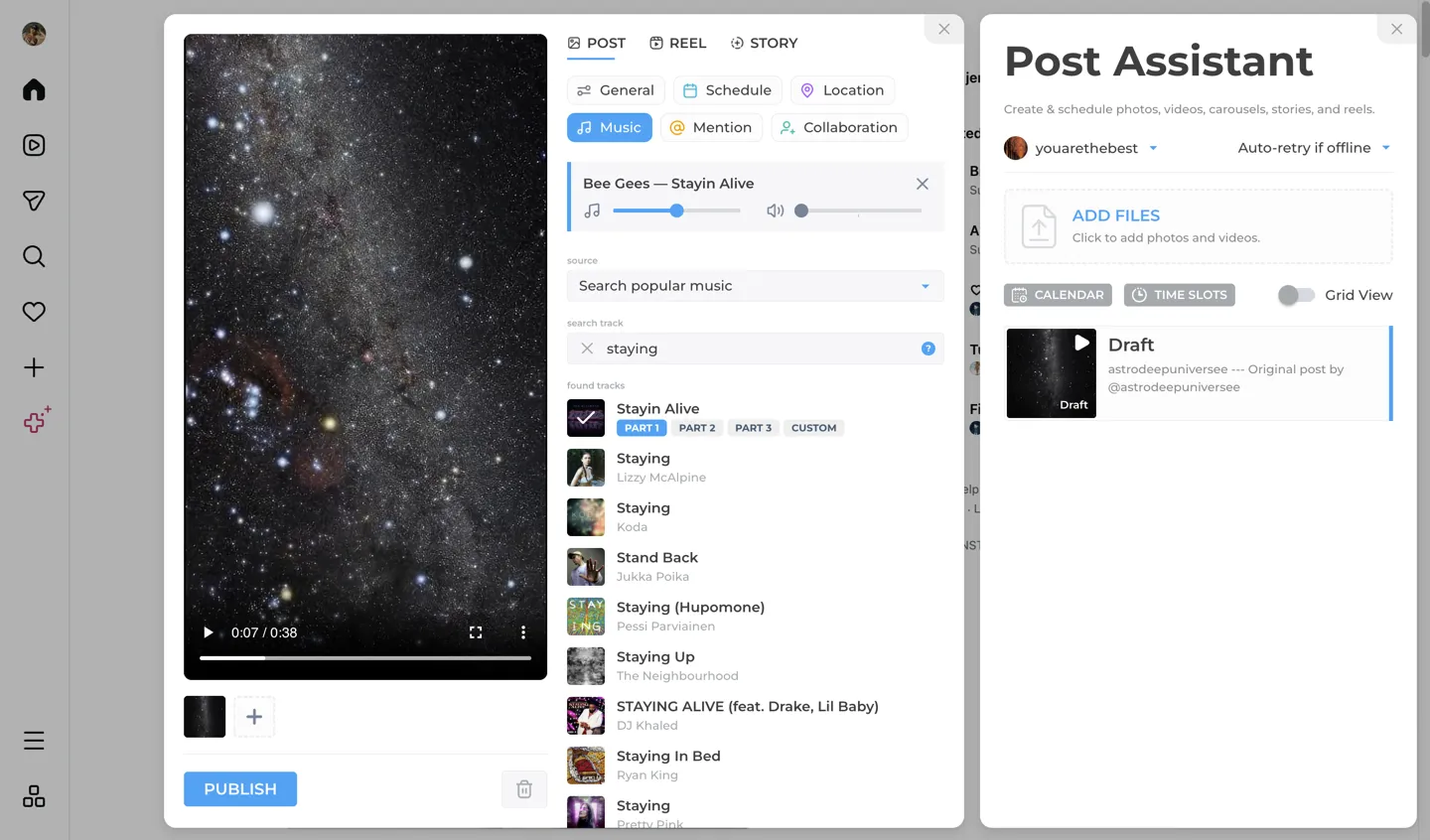
How to Add Music to Instagram Stories on PC
Step 1: Open the Story Editor
- Install INSSIST from the Chrome Web Store
- Go to Instagram.com and log in
- Open INSSIST and click Publish story (or Create & schedule for photos, reels, and stories)
- Upload your photo or video and select Story as the post type
Step 2: Choose a Music Source
- Click the Music tab in the editor settings panel
- Use the source dropdown to pick one of the three options:
- Instagram: search or browse trending tracks
- Royalty-Free: browse by mood category (Popular, Fashion, Cinema, Comedy, and more)
- Custom: drag and drop or click to upload an MP3 file
Step 3: Select and Customize Your Track
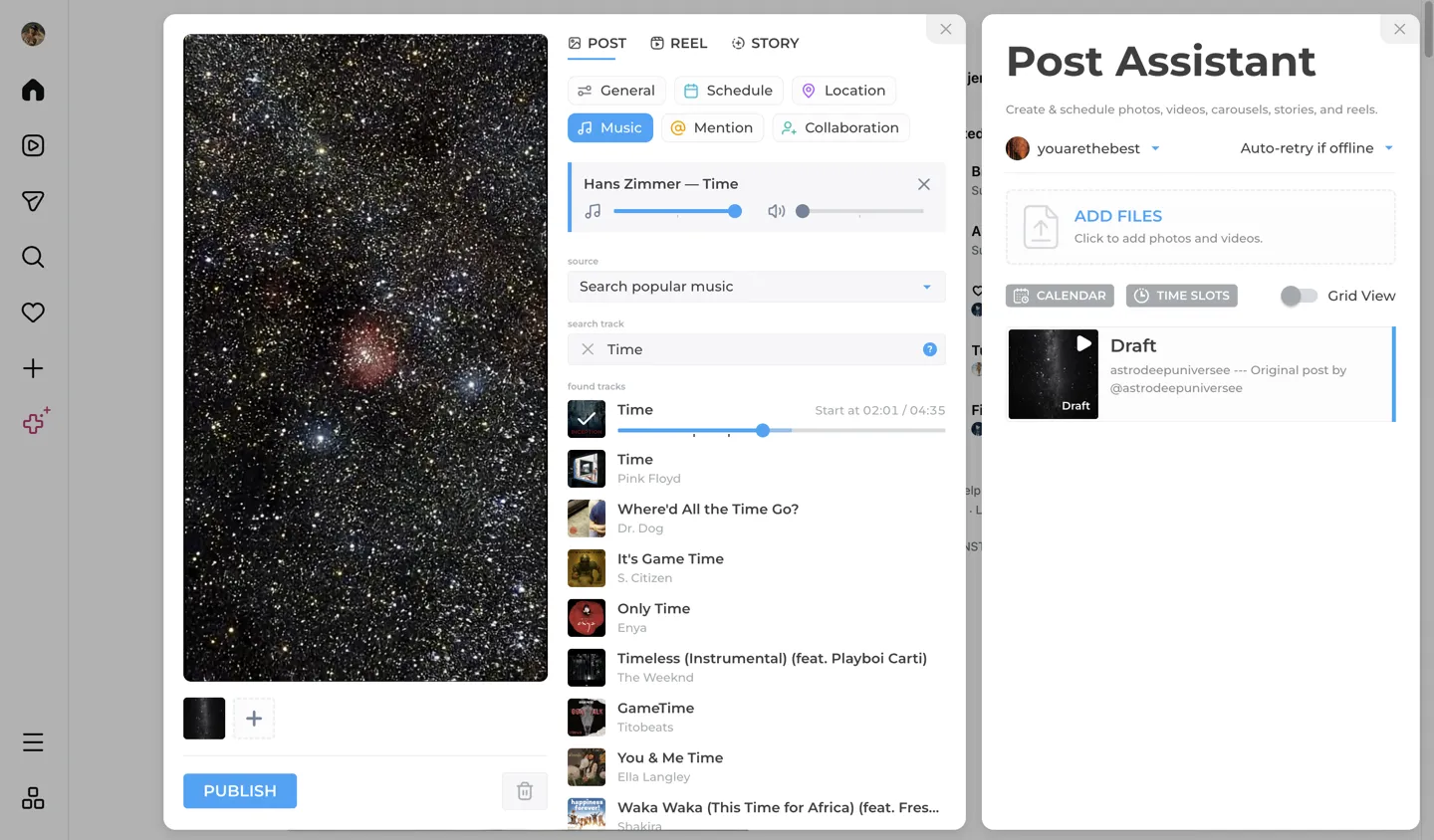
- Click a track to select it and a preview plays automatically
- Adjust the start position slider to pick where the song begins
- Set music volume and video volume independently using the dual sliders
- For photo Stories, choose the duration (5–15 seconds) to control how long the slide plays
Step 4: Publish
Click Post to publish your Story with music. INSSIST handles the audio attachment natively, so the result is identical to posting from the Instagram mobile app.
Adding Music to Reels and Posts
The same Music Library works for Reels and video posts too. The workflow is identical: open the editor, switch to the Music tab, pick a track, and adjust volume and start position. For Reels, the music syncs with your video timeline and plays back in the published Reel.
Note: For carousels, only the first media file can have a music track attached. This is an Instagram Web limitation, not an INSSIST restriction.
Browsing Royalty-Free Music
Royalty-Free library is organized into 19 mood-based categories:
🔥 Popular · 👗 Fashion · 🎬 Cinema · 😂 Comedy · 🍳 Cooking · 💼 Corporate · 📚 Education · 🎮 Gaming · 🧒 Kids · 🌿 Lifestyle · 🏔️ Nature · 🎙️ Podcast · 🔬 Science · ⚽ Sport · 💻 Tech · ✈️ Travel · 📹 Vlog · 💒 Wedding · 🚁 Aerials
Each track shows three mood tags (e.g., "Happy · Energetic · Exciting") so you can quickly find the right vibe. Categories you use frequently move to the top of the list automatically.
All tracks are royalty-free and safe for commercial use, with no DMCA takedowns or copyright strikes.
FAQ: Music on Instagram from PC
Can I use any song from Instagram's music library?
Yes. INSSIST connects to Instagram's own music catalog, so you have access to the same trending and popular tracks available on mobile. Search by song name or artist, or browse the curated popular selection.
Is the Music Library free?
Music Library is a PRO feature. You can browse and preview tracks for free, but attaching music to a published Story, Reel, or post requires an INSSIST PRO subscription.
What audio formats are supported for custom uploads?
MP3 files up to 30 MB. Other formats (WAV, AAC, OGG) are not supported, so convert them to MP3 first.
Can I add music to scheduled posts?
Yes. When using Post Later to schedule content, selected tracks (including Instagram tracks and custom uploads) are cached locally so they're available at publish time, even if you're offline when the post goes out.
Will the music show up on mobile Instagram?
Yes. Stories, Reels, and posts published with INSSIST music play audio identically to content posted from the mobile app. Followers see and hear the same result.
Can I adjust the volume separately for music and video audio?
Yes. The Music Library has independent volume sliders for music (0–100%) and video audio (0–100%). You can mute the original video entirely and keep only the music track, or blend both.
Conclusion
INSSIST is the only way to add music to Instagram Stories on PC. With access to Instagram's trending tracks, 700+ royalty-free songs, and custom MP3 uploads, you get the same music experience as the mobile app, without leaving your desktop. Combined with volume mixing, start position trimming, and support for Stories, Reels, and posts, the Music Library makes desktop content creation fully capable.
Latest posts
INSSIST & Instagram Insights
Learn Instagram marketing strategies and discover INSSIST features


Hanna Laas
10 Sep 2025

Ethan Campbell
1 Sep 2025

Ethan Campbell
9 Sep 2025

Hanna Laas
1 Aug 2025


Hanna Laas
1 Jul 2025


Ethan Campbell
12 Dec 2025
Supercharge your Instagram
Join over 500,000+ creators growing with INSSIST.