How to Pick Best Instagram Hashtags in 2026
Data-driven approach to selecting hashtags that will boost your Instagram reach and engagement. Use real-time Instagram analytics tools to find trending hashtags.

Ethan Campbell
Updated 24 Feb 2026

Table of contents
- Why Most People Choose Hashtags Wrong
- How INSSIST's Hashtag Assistant Works
- Using Instagram Insights to Inform Hashtag Choices
- Advanced Features for Hashtag Optimization
- How to Use Hashtags on Instagram Effectively
- How to Find Trending Hashtags on Instagram
- FAQ: Instagram Hashtag Strategy
- Maximize Your Instagram Growth Strategy
- Conclusion
TLDR; Pick Instagram hashtags by analyzing difficulty scores against your account's engagement level using data-driven Instagram analytics tools. With Instagram's new 5-hashtag limit (introduced December 2025), choosing the right hashtags matters more than ever. INSSIST's Tag Assist automatically calculates which hashtags you can realistically rank for, replacing guesswork with real-time analytics that maximize reach within the new constraints.
Why Most People Choose Hashtags Wrong
The problem isn't finding hashtags – it's finding the best Instagram hashtags that match your content's actual performance level. Using #love or #instagood might seem smart, but competing against millions of posts guarantees invisibility. While most Instagram analytics tools focus on follower counts and post performance, INSSIST's Tag Assist specializes in transforming Instagram hashtag research from gambling into data-driven strategy with real-time difficulty scoring.
INSSIST vs Other Instagram Analytics Tools
| Feature | Manual Research | Generic Tools | INSSIST Tag Assist |
|---|---|---|---|
| Data Analysis | Guessing from post counts | Static hashtag databases | Real-time engagement analytics |
| Difficulty Assessment | No way to measure competition | Generic popularity metrics | 4-tier personalized difficulty scoring |
| Performance Tracking | Manual tracking | Post-level analytics only | Automated 24-hour normalized metrics |
| Relevant Hashtags | Manual searching | Keyword suggestions | AI-powered hashtag discovery |
| Strategy Balance | Hope for the best | No competition analysis | Smart balance assessment |
| Time Investment | 15+ minutes per post | 10+ minutes configuration | 2-3 minutes total |
INSSIST analyzes actual Instagram data in real-time, calculating engagement rates, difficulty scores, and reach potential for every hashtag. This specialized Instagram hashtag analytics tool turns speculation into science, offering free Instagram analytics for hashtag performance that most comprehensive tools charge for.
How INSSIST's Hashtag Assistant Works
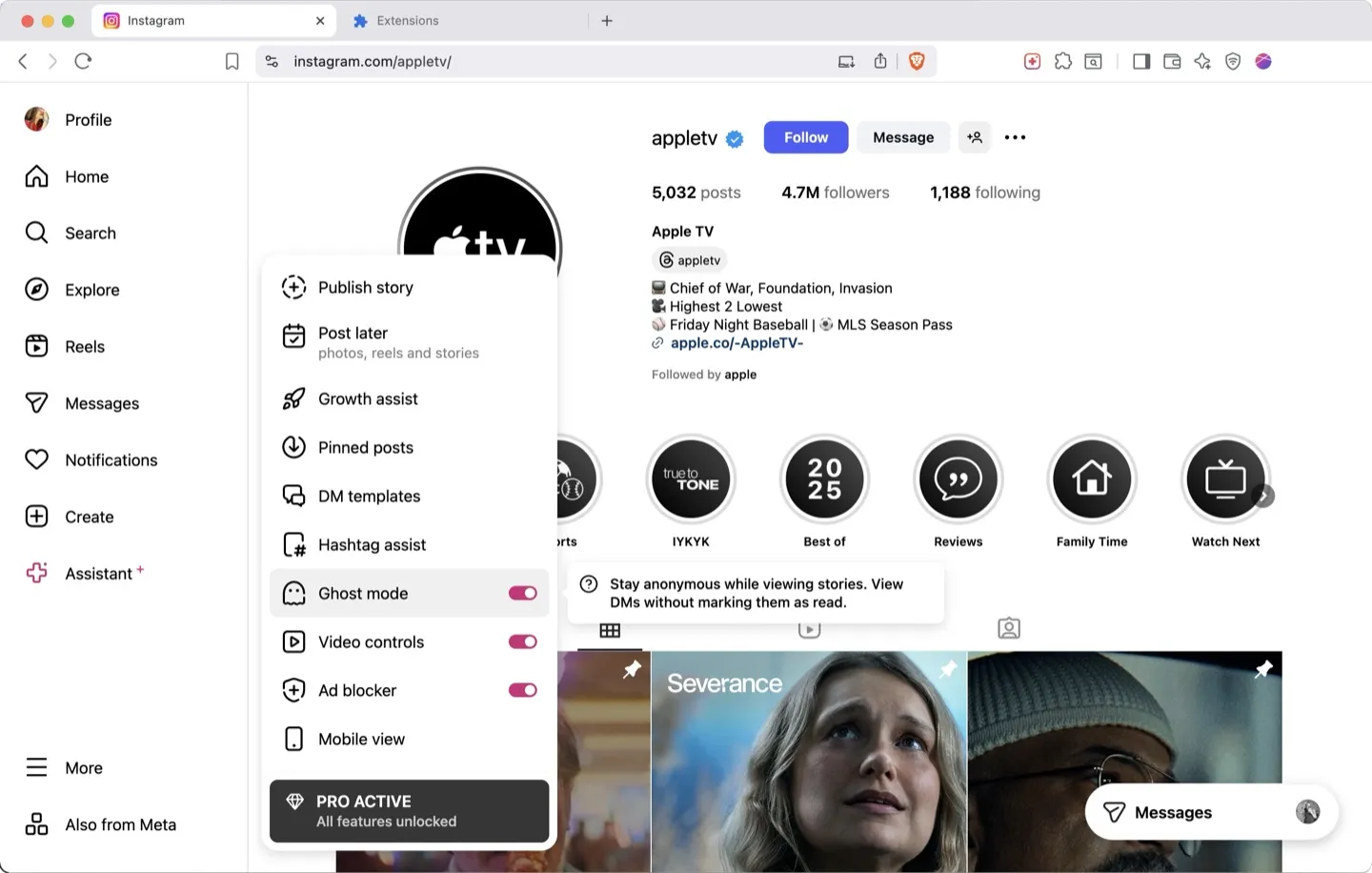
INSSIST automatically analyzes your last 42 posts to establish your baseline engagement. The system calculates your average likes and comments, normalized to 24-hour periods using Instagram's engagement decay algorithm. This becomes your benchmark for hashtag difficulty analysis.
Step 1: Search and Analyze Hashtags
Click Assistant+ and open Tag Assist module. Enter any hashtag to instantly see:
- Total Posts: Overall hashtag popularity
- Posts Per Day: Current trending velocity
- Average Likes: Normalized 24-hour engagement
- Average Comments: Community interaction level
- Difficulty Score: Color-coded competition level
- Reach Estimation: Potential audience size
Each metric uses INSSIST's proprietary normalization formula that accounts for Instagram's time-based engagement decay, providing accurate comparisons across different posting times.
Step 2: Build Your Hashtag Ladder
The LADDER feature creates the perfect hashtag mix:
- Enter 3-5 seed hashtags related to your content
- INSSIST discovers up to 1000 relevant hashtags
- Automatically sorts them into difficulty tiers:
- Low (Purple): Niche hashtags where you'll rank easily
- Medium (Pink): Balanced competition matching your level
- High (Coral): Challenging but achievable targets
- Very High (Orange): Extremely competitive hashtags
The system ensures you're using hashtags across all difficulty levels – essential for Instagram reach optimization in 2025.
Step 3: Create Hashtag Collections
Save time with reusable hashtag templates:
- Go to COLLECTIONS tab
- Create named collections for different content types
- Add hashtags with one-click selection
- Bulk analyze entire collections for performance
Collections automatically update with fresh analytics, ensuring your Instagram hashtag strategy stays current. Make sure to rotate your collections between posts to avoid Instagram's spam detection.
Using Instagram Insights to Inform Hashtag Choices
Understanding how to view Instagram analytics is crucial for data-driven hashtag selection. Instagram Insights provides the foundation for measuring which hashtags actually drive growth, while INSSIST's Tag Assist predicts which new hashtags to try.
Combining Native Analytics with Tag Assist
Start by reviewing your Instagram post analytics to identify your baseline engagement metrics. Navigate to your Instagram profile → Menu → Insights → Content to see which posts performed best. Note the average likes and comments for your top 10-20 posts from the past month.
INSSIST automatically analyzes these metrics from your last 42 posts, but cross-referencing with native Instagram insights helps you understand seasonal patterns and content type variations. Posts with higher-than-average engagement indicate you're targeting the right audience – use INSSIST's Ladder feature to find similar hashtags at that difficulty level.
Tracking Hashtag Performance Over Time
Instagram's native analytics show which posts drove profile visits and follows, but don't reveal which specific hashtags contributed. INSSIST's hashtag tracker feature fills this gap by monitoring how your posts perform under different hashtag combinations, creating an Instagram growth tracker for your hashtag strategy.
Compare your Instagram Insights follower growth chart against your hashtag collection rotation schedule in INSSIST. Spikes in followers often correlate with specific hashtag combinations – save these as collections for future use.
Advanced Features for Hashtag Optimization
Real-Time Competition Analysis
INSSIST's difficulty scoring uses a sophisticated algorithm:
Difficulty Rate = Hashtag Engagement / Your Account Engagement
This means a hashtag with 1000 average likes is "easy" for accounts averaging 2000 likes, but "hard" for accounts averaging 100 likes. The system personalizes every recommendation to your specific performance level.
If your account engagement is low, e.g. for fresh, brand ned or niche accounts, the system will suggest long-tail hashtags.
Performance Normalization Technology
INSSIST uses Instagram's engagement decay curve to normalize all metrics to 24-hour periods:
- Fresh posts show actual engagement
- Older posts get mathematically adjusted
- Accounts for Instagram's algorithm changes
This hashtag performance tracking ensures decisions based on current data, not outdated metrics.
How to Use Hashtags on Instagram Effectively
Knowing how to use hashtags on Instagram goes beyond just copying a list into your caption. Follow this 5-step workflow to maximize reach and grow Instagram followers organically:
Step 1: Research Relevant Hashtags
Use INSSIST's Tag Assist to search 3-5 seed keywords related to your content topic. The Ladder feature will discover up to 1,000 related hashtags sorted by difficulty. Focus on hashtags where your content has a realistic chance of ranking in "Top Posts" based on your account's engagement level.
Step 2: Select a Balanced Mix
Choose 3-5 hashtags for Instagram post success distributed across difficulty tiers:
- 1-2 low-difficulty hashtags (purple tier) for guaranteed visibility
- 2-3 medium-difficulty hashtags (pink tier) matching your engagement level
- 0-1 high-difficulty hashtags (coral tier) for stretch reach
Instagram introduced a 5-hashtag maximum limit in December 2025 to reduce spam and prioritize content quality. This strategic balance ensures immediate visibility while building toward higher-competition hashtags as your account grows.
Step 3: Place Hashtags Strategically
Add hashtags either in your caption or first comment. Instagram's algorithm treats both equally for reach purposes. For cleaner aesthetics, many creators add hashtags in the first comment within 60 seconds of posting. Include your primary keyword hashtag in the caption for better post searchability.
Step 4: Rotate Collections Between Posts
Never use identical hashtag sets repeatedly. Create 3-5 collections in INSSIST's Collections tab and rotate them across posts. This avoids Instagram's spam detection while maintaining niche consistency. Update collections monthly as your engagement metrics improve to target progressively higher-difficulty hashtags.
Step 5: Track Performance and Adjust
Monitor which hashtag collections drive the most profile visits and followers using Instagram Insights. INSSIST's hashtag analytics show performance trends over time, helping you improve Instagram engagement through data-driven refinement. Double down on hashtags that consistently deliver results and remove underperformers every 30 days as part of your Instagram engagement strategies.
Best Hashtags for Instagram Reels
Instagram Reels follow the same 5-hashtag limit as Feed posts. Avoid oversaturated Reels-specific hashtags like #reels, #reelsinstagram, and #instareels – instead, focus on niche content hashtags that describe what your Reel teaches or demonstrates.
Successful hashtags for Reels combine:
- Content-specific tags (#photoshoptutorial, #veganrecipes)
- Action-based tags (#howtomake, #tutorial)
- Niche community tags relevant to your target audience
INSSIST's Tag Assist shows which hashtags have high "Posts Per Day" activity, indicating currently active hashtags in your niche. For Reels, prioritize hashtags with strong engagement rather than high post counts, as the algorithm emphasizes watch time and shares over hashtag reach. Learn more about optimizing Reels content in our guide on sharing TikTok to Instagram Reels.
How to Find Trending Hashtags on Instagram
Discovering trending Instagram hashtags gives your content immediate visibility in active conversations. INSSIST's "Posts Per Day" metric reveals real-time trending velocity – hashtags with high daily activity relative to their total post count indicate surging popularity.
Real-Time Trending Indicators
Look for these signals when evaluating hashtag trending potential:
- High Posts Per Day relative to total post count (indicates acceleration)
- Recent engagement spikes in top posts (check timestamps within 24-48 hours)
- Seasonal relevance (holidays, events, cultural moments)
- Consistent daily activity rather than sporadic bursts
Finding Niche Trending Hashtags
Generic trending hashtags like #viral or #trending are too competitive. Instead, use INSSIST's Ladder feature to discover niche-specific trending tags:
- Enter your core niche hashtag (e.g., #sustainablefashion)
- Sort discovered hashtags by "Posts Per Day"
- Filter for medium difficulty level matching your engagement
- Check if top posts are recent (last 24-72 hours)
Trending niche hashtags offer 10-20x better reach than broad trending tags because you're competing against hundreds of posts instead of millions. Monitor your hashtag collections weekly to identify which tags are gaining momentum versus declining.
The best Instagram hashtags aren't static – they evolve with platform trends, seasonal content, and algorithm updates. INSSIST's real-time data ensures you're always using currently relevant tags rather than outdated recommendations.
FAQ: Instagram Hashtag Strategy
How many hashtags should I use on Instagram?
Instagram introduced a strict 5-hashtag maximum in December 2025 to reduce spam and shift focus toward content quality. The optimal number is 3-5 highly relevant hashtags distributed across difficulty tiers. This limit applies to all post types (Feed, Reels, Stories). Focus on quality over quantity – choose hashtags that precisely match your content and target audience.
What are the best hashtags for Instagram growth?
The best hashtags for likes and followers match your current engagement level. Use INSSIST's Ladder feature to find hashtags where your content can realistically rank in "Top Posts," typically those with similar or slightly lower engagement than your average. Combine strategic hashtag selection with proven organic Instagram growth strategies for maximum results.
What makes a good Instagram hashtag?
Good hashtags have:
- Engagement levels matching your account
- Active daily posting (not dormant)
- Relevant audience for your niche
- No ban or restriction flags
INSSIST automatically evaluates all these factors.
How to avoid shadowbanned hashtags?
INSSIST flags banned and restricted hashtags with warning indicators. The system checks Instagram's internal ban lists in real-time, preventing accidental shadowban triggers.
Can I track hashtag performance over time?
Yes, INSSIST stores historical data with timestamps. Collections show performance changes, helping identify which hashtags drive growth versus those losing effectiveness.
Should I use the same hashtags repeatedly?
INSSIST's Collections feature encourages variety. Create multiple collections and rotate them to avoid Instagram's spam detection while maintaining consistency in your niche. For deeper strategy guidance, see our Ultimate Instagram Hashtag Guide.
How does INSSIST compare to other hashtag tools?
INSSIST analyzes actual Instagram data in real-time, while most hashtag analytics tools rely on static databases. The 24-hour normalization and personalized difficulty scoring are unique features unavailable elsewhere. Using real-time data ensures you're always targeting currently effective hashtags rather than outdated recommendations.
What is the best free Instagram hashtag generator?
INSSIST's Tag Assist includes a free tier that generates relevant hashtags based on your seed keywords. The Ladder feature discovers up to 1000 related hashtags automatically, sorted by difficulty level for your account.
How to avoid banned hashtags on Instagram?
INSSIST automatically flags banned and restricted hashtags with warning indicators. When you search or add hashtags to collections, the system checks Instagram's internal ban lists in real-time and alerts you to any problematic tags. Avoid hashtags marked with warning symbols to prevent shadowbanning and reduced reach.
Maximize Your Instagram Growth Strategy
Hashtag optimization is just one piece of effective Instagram growth. Combine Tag Assist with INSSIST's other features to build a comprehensive strategy:
- Schedule Instagram posts at optimal times for your audience
- Automate organic engagement with Growth Autopilot
- Track Instagram unfollowers to refine your content strategy
INSSIST's advanced Instagram analytics tools help you identify and use hashtags that will actually grow your Instagram presence in 2026.
Conclusion
Effective Instagram hashtag research in 2026 requires data, not guesswork – especially with Instagram's new 5-hashtag limit making every choice critical. INSSIST's Tag Assist transforms hashtag selection from time-consuming trial-and-error into a scientific process that consistently improves reach and engagement, functioning as one of the most powerful Instagram growth tools available.
The combination of real-time analytics, intelligent discovery, and personalized difficulty scoring means you're always using hashtags optimized for your specific performance level. With only 5 hashtag slots available, INSSIST's difficulty analysis ensures you choose tags where your content can actually rank, maximizing visibility within the new constraints. Whether you're growing from 100 to 1,000 followers or scaling from 10K to 100K, INSSIST ensures your hashtag strategy evolves with your account.
Latest posts
INSSIST & Instagram Insights
Learn Instagram marketing strategies and discover INSSIST features


Hanna Laas
10 Sep 2025

Ethan Campbell
1 Sep 2025

Ethan Campbell
9 Sep 2025

Hanna Laas
1 Aug 2025


Hanna Laas
1 Jul 2025

Ethan Campbell
12 Apr 2026

Supercharge your Instagram
Join over 500,000+ creators growing with INSSIST.