How to See Who Unfollowed You on Instagram
Track Instagram followers and unfollowers with a free follower tracker. Monitor who unfollowed you, detect bots, and export follower lists securely.

Ethan Campbell
Updated 24 Feb 2026

Instagram doesn't show who unfollows you, leaving creators blind to audience changes. INSSIST's Instagram follower tracker reveals who stopped following you on Instagram, monitors growth patterns, detects bot followers, and exports complete follower lists—all securely from your browser.
Why Instagram Hides Unfollower Data
Instagram deliberately doesn't notify users about unfollowers to reduce conflict and maintain platform engagement. This leaves account owners unable to:
- Identify Content Issues: Discover which posts trigger unfollows
- Track Audience Quality: Distinguish between real users and bot unfollows
- Optimize Timing: Understand when followers disengage most
- Measure Campaign Impact: See how promotions affect follower retention
Manual unfollower tracking is time-consuming and inaccurate. Most Instagram unfollower tracker apps require server access to your account, creating security risks while providing limited insights.
Without unfollower insights, you're managing your Instagram presence blindfolded.
Meet INSSIST's Instagram Follower Tracker
INSSIST is a comprehensive Instagram followers tracker that monitors both new followers and unfollowers directly from your browser. This Instagram follower tracking tool provides real-time Instagram insights while operating client-side to maintain complete account security.
Manual Checking vs INSSIST Follower Tracker
| Feature | Manual Tracking | INSSIST Instagram Follower Tracker |
|---|---|---|
| Time Investment | Impractical, hours daily | Fully automated |
| Accuracy | Error-prone guesswork | Precise real-time detection |
| Historical Data | None | 60-days follower graphs |
| Bot Detection | Manual assessment | AI-powered filtering |
| Data Export | Screenshots at best | Full followers CSV exports |
| Account Security | Safe | Safe, client-side |
This Instagram analytics tool provides insights impossible to achieve manually while operating entirely from your device as a secure Instagram follower checker.
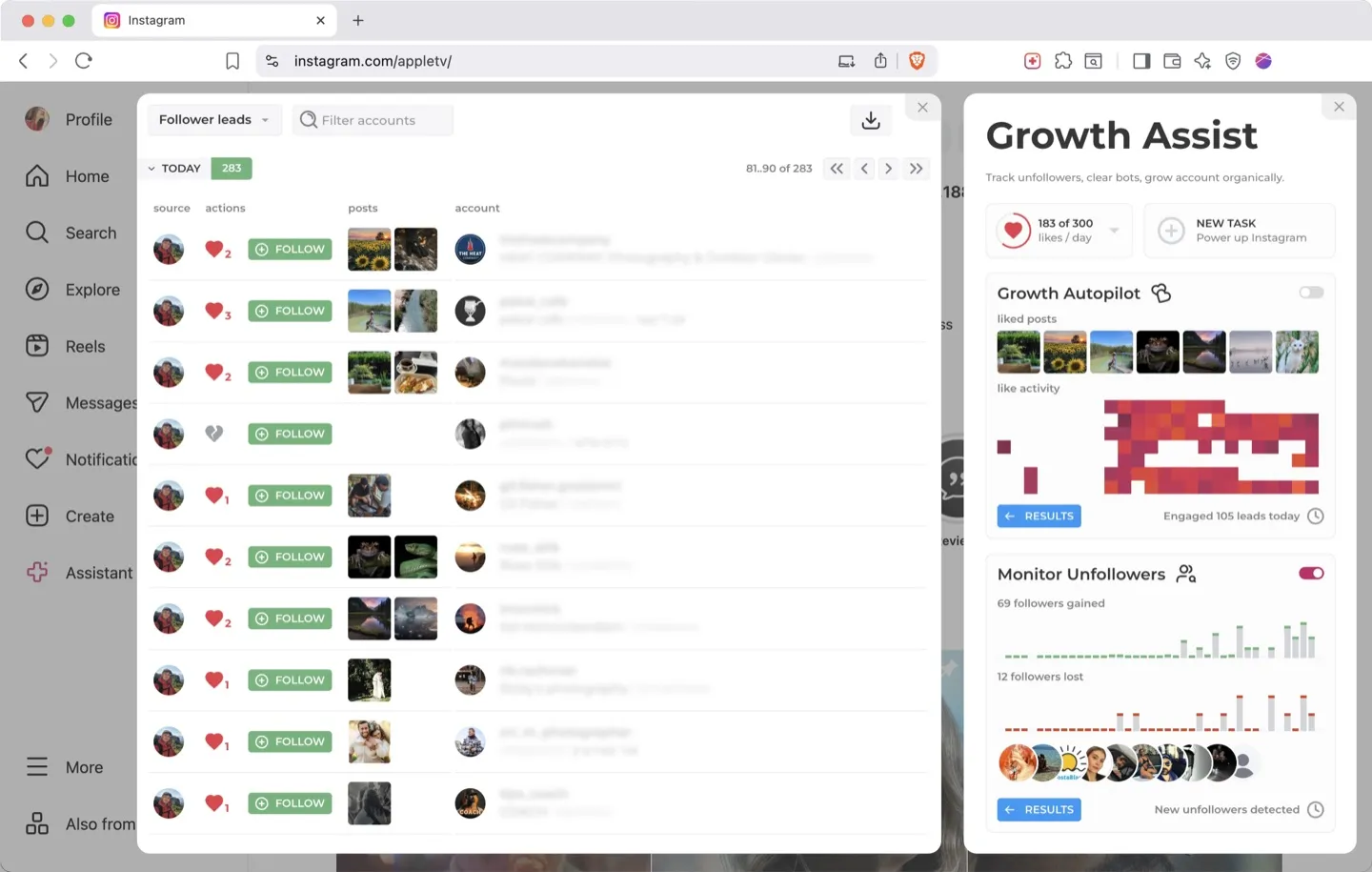
How to Track Instagram Followers and Unfollowers with INSSIST
Step 1: Install and Access Growth Assist
- Install INSSIST from the Chrome Web Store
- Navigate to Instagram.com and log in
- Click Assistant+ → Growth Assist in the extension popup
- Enable Track Unfollowers to begin tracking
INSSIST automatically begins analyzing your follower list, building baseline data for future comparisons.
Step 2: View Unfollower Insights
INSSIST continuously scans the follower list at regular intervals, approximately once a day. You can view the results by clicking the RESULTS button in the Growth Assist module.
The followers and unfollowers tracker displays:
- Unfollowers: Fresh losses with timing data
- New Followers: Recent gains in followers
- All Followers: Complete list of account followers, ready for export
Use advanced filtering in the Results view:
- Bot Detection: Filter out fake account unfollows (learn more about removing Instagram bot followers)
- Fresh Account Analysis: Identify newly-created followers
- Faceless Account Filtering: Accounts without profile pictures
Instagram Follower Tracking Features
Smart Detection System
INSSIST employs sophisticated algorithms to provide accurate follower insights:
- Bot Identification: Automatically flags Instagram bot followers with suspicious patterns
- Fresh Account Detection: Identifies recently created accounts
- Historical Graph Analysis: Visualizes follower growth trends with the Instagram growth tracker
CSV Export Capabilities
This Instagram follower export tool lets you download comprehensive follower data including:
- Username, full name, and profile URLs
- Follow/unfollow timestamps
- Bot probability scores
- Account verification status
- Avatar status and privacy settings
PRO features provide unlimited exports while free users receive sample data. For more details on exporting capabilities, see our complete guide on how to export Instagram followers.
Privacy-First Operation
Unlike server-based competitors, INSSIST:
- Processes data locally in your browser
- Never uploads follower lists to external servers
- Maintains complete account security with your existing Instagram session
- Provides instant insights without API delays or restrictions
FAQ: Unfollower Tracking on Instagram
Can I see who unfollowed me on Instagram?
Instagram doesn't provide native unfollower notifications, but INSSIST's Instagram unfollower tracker fills this gap. Operating from your browser, it compares follower lists over time to identify exact unfollowers with timestamps and detailed analytics.
How to track Instagram unfollowers automatically?
INSSIST automates unfollower detection by running background scans at configurable intervals. The system detects changes instantly and groups unfollowers by time periods (Today, Yesterday, Past Week) for easy analysis.
Why do people unfollow on Instagram?
Common unfollowing triggers include:
- Content quality changes or posting inconsistency
- Excessive promotional posts or spam-like behavior
- Algorithm changes reducing your content visibility
- Account cleanup where users unfollow inactive accounts
- Bot purges when Instagram removes fake followers
INSSIST's timeline analysis helps identify which posts and actions correlate with unfollower spikes. To improve retention, consider optimizing your Instagram hashtag strategy and using Instagram growth tools to maintain consistent engagement.
Is it safe to use unfollower tracking apps?
INSSIST is uniquely safe because it operates entirely client-side from your browser. Unlike server-based apps that require your Instagram credentials, INSSIST uses your existing session and never accesses your login information. All data remains local to your device.
How often should I check my unfollowers?
For optimal Instagram audience analytics, check unfollowers weekly rather than obsessing daily. INSSIST's automated tracking means you can review patterns periodically without constant monitoring. Focus on trends rather than individual unfollows to maintain healthy engagement practices.
Who should use INSSIST's unfollower tracker?
Perfect for anyone serious about understanding their Instagram audience dynamics:
- Content creators optimizing engagement strategies
- Businesses tracking customer retention and campaign impact
- Influencers maintaining authentic follower relationships
- Marketers measuring social media ROI and audience quality
What is the best Instagram follower tracker app?
INSSIST stands out as the best Instagram follower tracker app because it operates entirely client-side from your browser, ensuring complete security without requiring server access. Unlike other Instagram follower tracker apps that upload your data, INSSIST processes everything locally while providing comprehensive analytics, bot detection, and CSV export capabilities for both free and premium users.
How do I check unfollowers on Instagram for free?
Install INSSIST's free browser extension and enable the Track Unfollowers feature in Growth Assist. The free Instagram analytics tool automatically scans your follower list daily, tracking changes and identifying unfollowers without any cost. Free users get complete unfollower detection with sample data exports, while PRO users receive unlimited exports and advanced filtering.
Can I download my Instagram followers list?
Yes, INSSIST provides an Instagram followers export tool that downloads your complete follower list as a CSV file. The export includes usernames, full names, profile URLs, follow timestamps, bot probability scores, verification status, and privacy settings. This makes it easy to analyze your audience, backup follower data, or integrate with other marketing tools.
Conclusion
INSSIST's Instagram follower tracker transforms blind Instagram management into strategic audience optimization. As one of the most comprehensive Instagram analytics tools available, it enables data-driven content decisions while maintaining complete account security.
Whether you want to track Instagram followers, monitor unfollowers, or analyze Instagram bot followers, INSSIST provides the insights you need to build more engaging content and authentic follower relationships.
Latest posts
INSSIST & Instagram Insights
Learn Instagram marketing strategies and discover INSSIST features


Hanna Laas
10 Sep 2025

Ethan Campbell
1 Sep 2025

Ethan Campbell
9 Sep 2025

Hanna Laas
1 Aug 2025

Hanna Laas
1 Jul 2025

Ethan Campbell
12 Apr 2026


Ethan Campbell
12 Dec 2025
Supercharge your Instagram
Join over 500,000+ creators growing with INSSIST.