How to Export Instagram Followers in 2026
Learn how to export Instagram followers and followings to a CSV file with usernames, public profile data, and bot detection flags.

Ethan Campbell
Updated 24 Feb 2026

Instagram doesn't let you export follower lists. INSSIST exports any public account's followers to CSV with bot detection, verification status, and profile data for lead generation and audience analysis.
Why Export Instagram Followers?
Exporting follower data unlocks several practical use cases for Instagram growth tools and analytics:
- Lead Generation: Export followers from competitor accounts or industry influencers to identify potential customers
- Fake Follower Check: Analyze follower quality with built-in bot detection to identify fake followers and improve engagement rates
- Instagram Insights: Understand audience composition, verification rates, and follower demographics
- Data Backup: Keep a record of your followers outside Instagram's platform
- CRM Integration: Import follower data into marketing tools, spreadsheets, or databases
What Data Gets Exported
INSSIST exports rich profile data for each follower:
| Field | Description |
|---|---|
| Username & URL | Direct link to each profile |
| Full Name | Display name from profile |
| Is Verified | Blue checkmark status |
| Is Bot | Automatically detected suspicious accounts (learn about bot detection) |
| Is Faceless | Accounts without profile pictures |
| Is Fresh | Recently created accounts |
| Relationship | Whether they follow you back |
This metadata acts as an Instagram follower checker, helping you filter quality leads from fake followers, bots, and inactive accounts.
How to Export Followers with INSSIST
Step 1: Create an Export Task
- Install INSSIST from the Chrome Web Store
- Navigate to Instagram.com and log in
- Click Assistant+ → Growth Assist in the extension popup
- Click the + button and select Export Followers or Export Followings
Step 2: Configure and Start the Scan
- Enter the target username (your account or any public account)
- Select whether to export Followers or Followings
- Toggle the task ON to begin scanning
INSSIST scans up to 100,000 accounts, displaying results in real-time.
Step 3: Filter and Download Your Followers List
Once the scan completes, click RESULTS to review the data:
- Use filters to show/hide bots, faceless accounts, or fresh profiles
- Search by username to find specific accounts
- Click the Download button to export filtered results as CSV
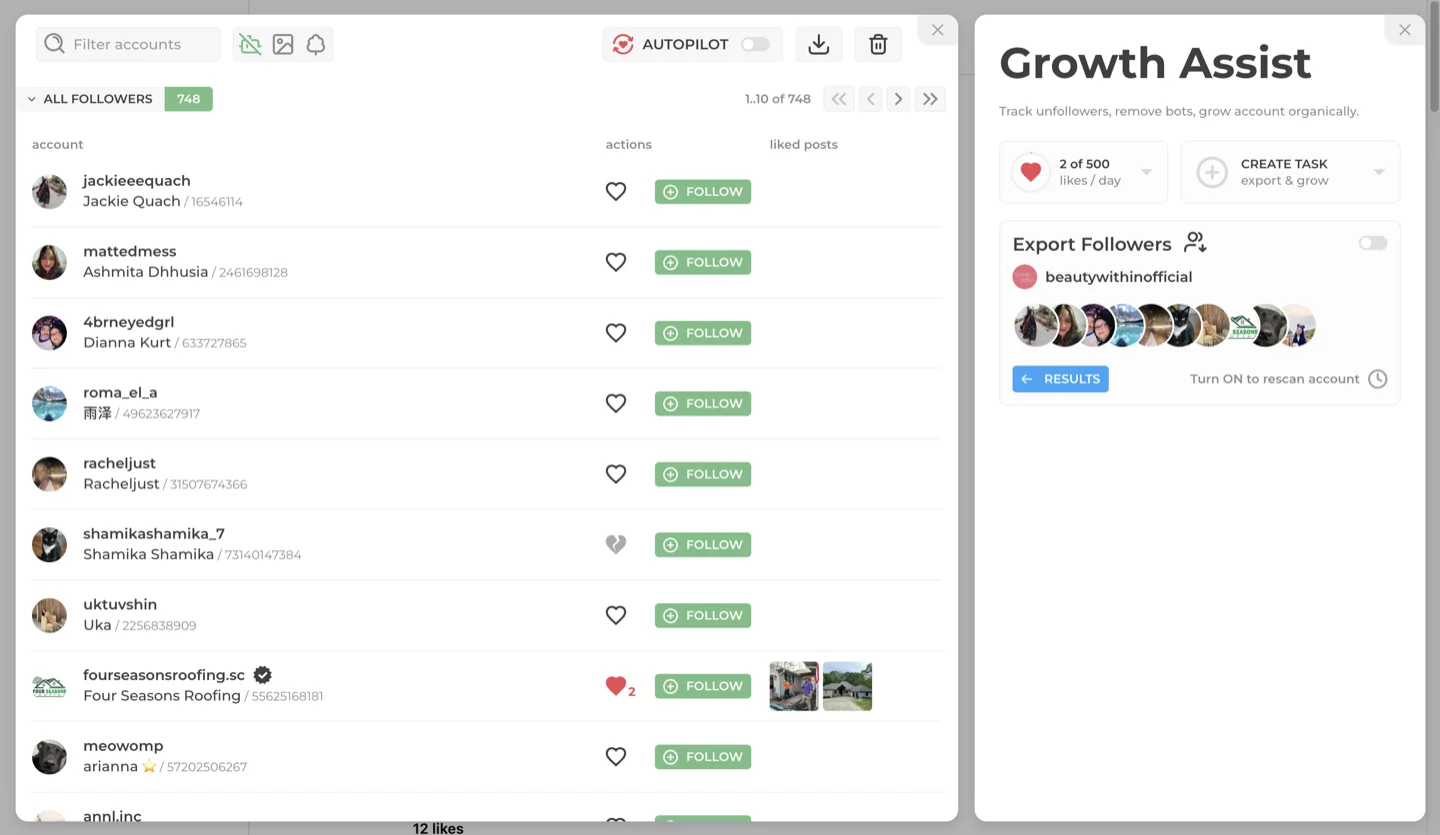
The CSV file includes all profile fields and can be opened in Excel, Google Sheets, or imported into any CRM.
FAQ
Can I export followers from any Instagram account?
Yes, you can export followers from any public Instagram account. Data on private accounts can not be exported.
How many followers can I export?
INSSIST can scan and export up to 100,000 followers or followings per task. Free users have a limit on CSV export rows; PRO users can export unlimited data.
What format is the export file?
Followers export as a CSV (comma-separated values) file that opens in Excel, Google Sheets, Numbers, or any spreadsheet application.
Does exporting followers notify the account owner?
No. Exporting follower data is read-only and doesn't trigger any notifications or appear in activity logs.
How does bot detection work in exports?
INSSIST automatically analyzes each profile for bot indicators and behaviors and flags them in the CSV with "Is Bot", "Is Faceless", and "Is Fresh" columns. This built-in fake follower check helps you identify suspicious accounts without additional tools.
Is it legal to export Instagram followers?
Exporting publicly available profile data for personal use, research, or business analysis is generally permissible. The exported data (usernames, display names, verification status) is publicly visible on Instagram. Always respect privacy laws in your jurisdiction and use exported data responsibly.
How to download Instagram follower list to Excel?
Use INSSIST to scan any account's followers, then click the Download button to export as CSV. Open the CSV file directly in Microsoft Excel or Google Sheets. The export includes usernames, profile URLs, verification status, and bot detection flags in spreadsheet-ready format.
How to export someone's Instagram followers?
In INSSIST, click Assistant+ then Growth Assist, create a new Export Followers task, and enter any public account's username. INSSIST scans their follower list and exports all profile data to CSV. Works for competitors, influencers, or any public Instagram account.
How to get a list of all my Instagram followers?
Create an Export Followers task in INSSIST and enter your own username. The scan captures your complete follower list with additional data like bot detection, verification status, and whether each follower follows you back. Export to CSV for backup or analysis.
How to check for fake followers on Instagram?
Use INSSIST's export feature to scan any account's followers with built-in fake follower detection. The tool automatically flags suspicious accounts based on bot indicators like missing profile pictures, fresh account age, and suspicious patterns. Export results show "Is Bot", "Is Faceless", and "Is Fresh" columns so you can identify fake Instagram followers instantly.
How to analyze Instagram account follower quality?
Export the account's followers with INSSIST to get detailed analytics on follower quality. The CSV includes verification status, bot flags, and relationship data for each follower. Calculate metrics like bot percentage, verification rate, and follower-to-following ratios to analyze any Instagram account's audience quality and authenticity.
Can I use this as an Instagram follower checker tool?
Yes. INSSIST functions as a comprehensive Instagram follower checker by scanning accounts and providing detailed data on each follower. Unlike basic follower counter apps, it checks follower quality, detects bots, shows verification status, and exports everything to CSV for deeper analysis in Excel or Google Sheets.
Related Instagram Growth Tools
Looking for more ways to optimize your Instagram presence?
- Track Instagram Unfollowers: Automated follower tracking with 60-day graphs and real-time unfollower detection
- Remove Bot Followers: Clean your follower list and improve engagement rates by up to 30%
- Grow Instagram on Autopilot: Auto-like, lead generation, and growth automation tools
Conclusion
Exporting Instagram followers gives you actionable data for lead generation, audience analysis, and marketing research. INSSIST handles the heavy lifting of scanning thousands of profiles and enriching the data with bot detection, so you can focus on using the insights to grow your business.
Latest posts
INSSIST & Instagram Insights
Learn Instagram marketing strategies and discover INSSIST features


Hanna Laas
10 Sep 2025

Ethan Campbell
1 Sep 2025

Ethan Campbell
9 Sep 2025

Hanna Laas
1 Aug 2025


Hanna Laas
1 Jul 2025

Ethan Campbell
12 Apr 2026

Supercharge your Instagram
Join over 500,000+ creators growing with INSSIST.