How to Bulk Download Instagram Profiles, Stories, Highlights, Posts & Reels
Download entire Instagram profiles in one click. Bulk save stories, highlights, and posts with progress tracking, organized folders, and metadata export using INSSIST.

Ethan Campbell
Published 3 Mar 2026

Table of contents
- Why Bulk Download Instagram Profiles?
- Best Instagram Video Downloader: INSSIST vs. Others
- How to Bulk Download Instagram Profiles with INSSIST
- Save Instagram Stories to Computer Before They Disappear
- Bulk Download Instagram Highlights
- Bulk Download Instagram Posts and Save Instagram Reels
- Managing Multiple Profile Downloads
- FAQ: Instagram Bulk Profile Downloads
- Conclusion
Use INSSIST to bulk download entire Instagram accounts - download Instagram videos, stories, highlights, posts, and reels from any public profile. Just enter a username, pick what you want, and INSSIST handles the rest with progress tracking and organized file exports. Works from desktop, no mobile app required.
Why Bulk Download Instagram Profiles?
- Content Research: Analyze competitor strategies and posting patterns
- Account Backup: Use INSSIST as your Instagram backup tool to save your content
- Inspiration Libraries: Build collections from creators you admire
- Archival: Preserve content from accounts that may go private
- Post Analytics: Export engagement data (likes, comments, dates) for analysis e.g. using Artificial Intelligence
Best Instagram Video Downloader: INSSIST vs. Others
We compared INSSIST to popular Instagram download tools including Inflact, 4K Stogram, SaveInsta, and SnapInsta. Here's how they stack up:
| Feature | INSSIST | Inflact | 4K Stogram | SaveInsta, SnapInsta |
|---|---|---|---|---|
| HD Video (DASH Manifest) | Yes | - | - | - |
| Bulk Profile Downloads | Yes | Yes | Yes | - |
| Export Stories | Yes | Yes | Yes | Yes |
| Export Highlights | Yes | Yes | Yes | Yes |
| Export Reels | Yes | Yes | Yes | Yes |
| Export Post Stats | Yes | Yes | Yes | - |
| Organized Folders | Yes | Yes | Yes | - |
| No App Install | Yes | Yes | - | Yes |
| Still Maintained | Yes | Yes | - | Yes |
Note: 4K Stogram has been discontinued and no longer receives updates. Inflact requires a Premium subscription for bulk downloads and post stats export.
Why INSSIST quality is better: INSSIST processes Instagram's DASH video manifests to extract and merge the highest quality video and audio streams - the same technology Instagram uses internally. Most tools download compressed versions, resulting in lower resolution and audio quality.
How to Bulk Download Instagram Profiles with INSSIST
Step 1: Install Free INSSIST Chrome Extension
- Install INSSIST from the Chrome Web Store
- Navigate to Instagram.com and log in
- Select Downloads from the INSSIST menu
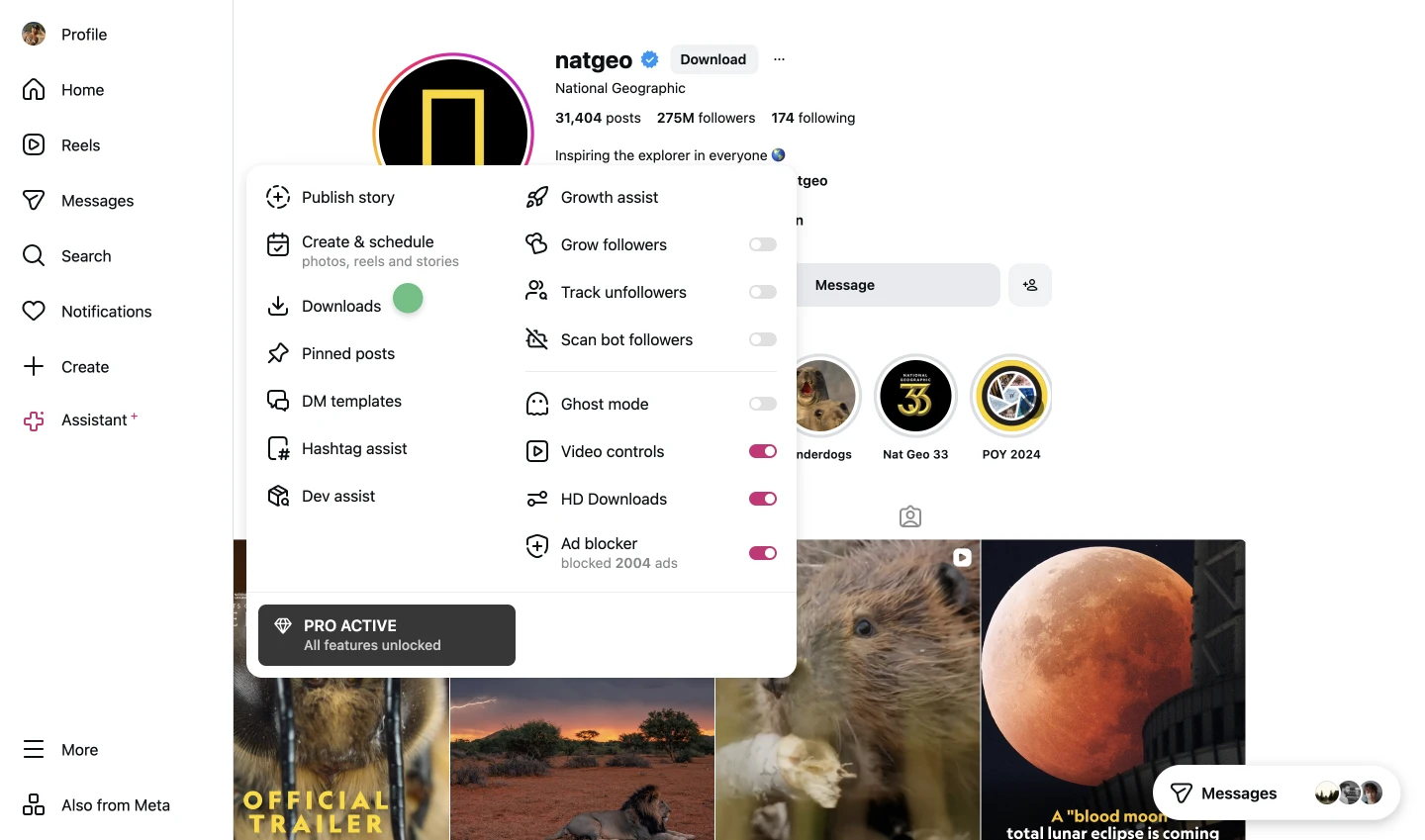
Step 2: Enter the Profile Username
- Click New Download
- Enter the Instagram username (e.g.,
natgeo)
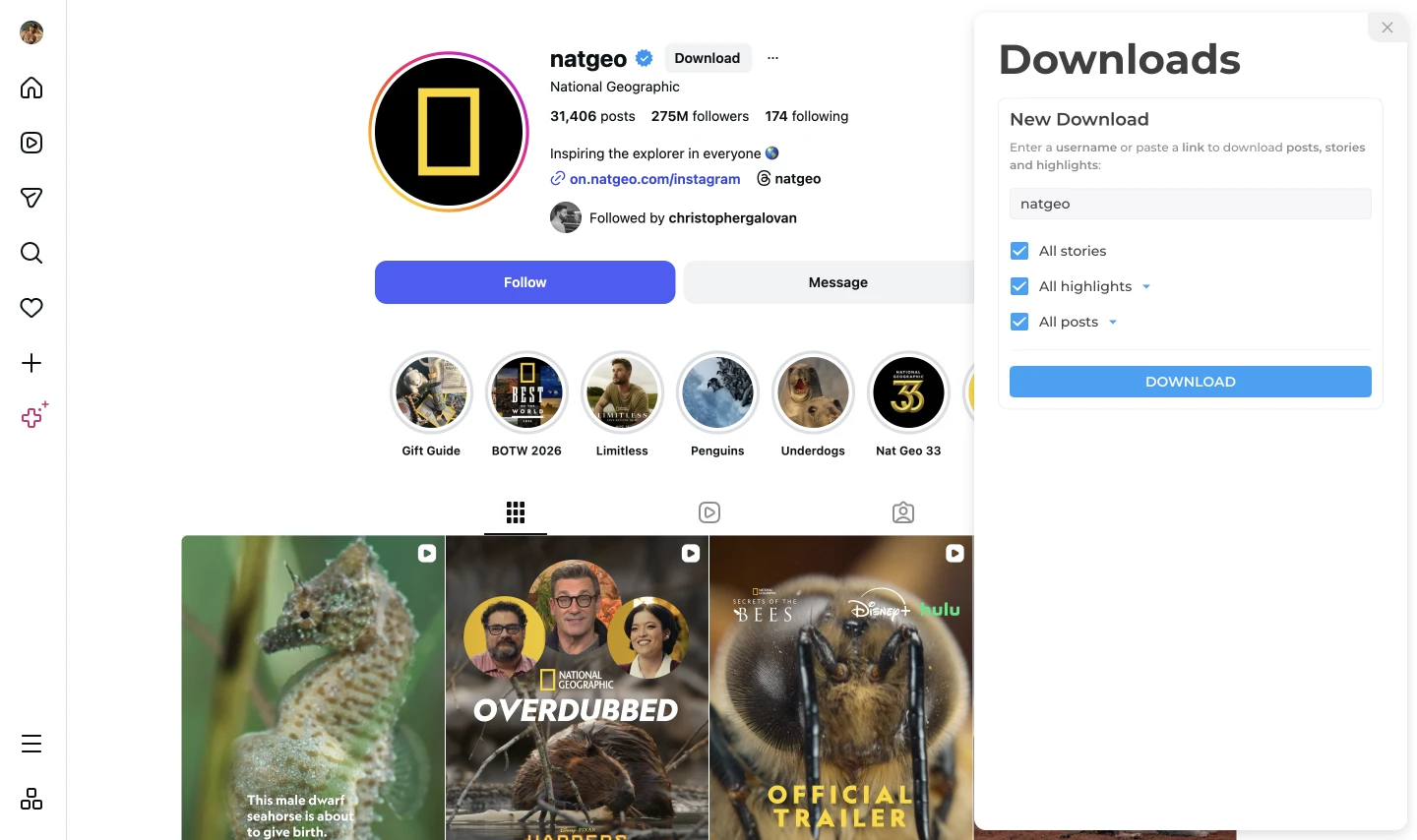
Step 3: Select Content to Download
INSSIST supports downloading the following content:
- Stories - All active stories (within 24-hour window)
- Highlights - Saved story collections from the profile
- Posts and Reels - Photos, videos, carousels, and reels
Toggle each content type on or off and set download limits based on your needs.
Step 4: Start Download and Monitor Progress
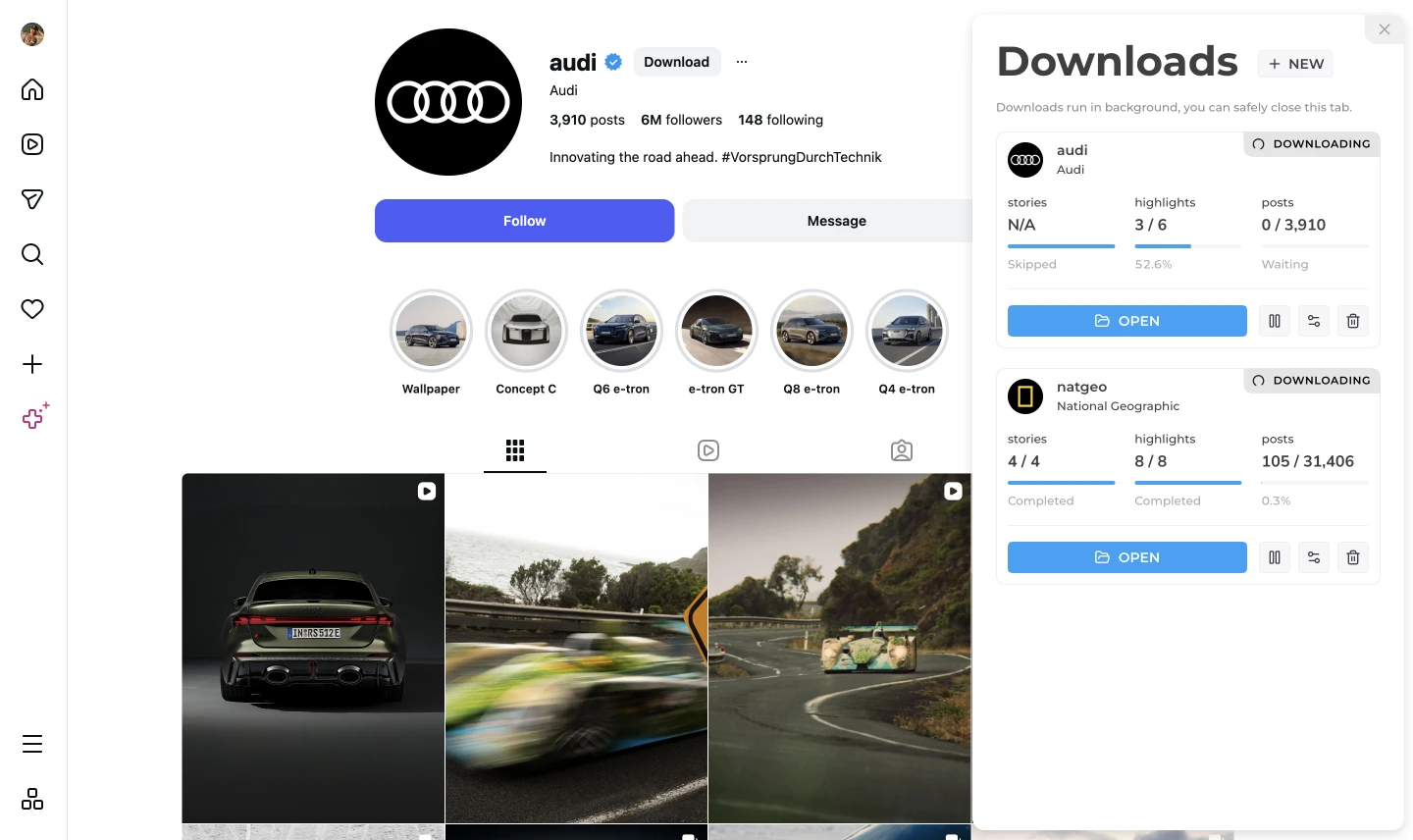
Click Download to begin. INSSIST shows real-time progress for each content type. Downloads run in the background - you can keep browsing Instagram.
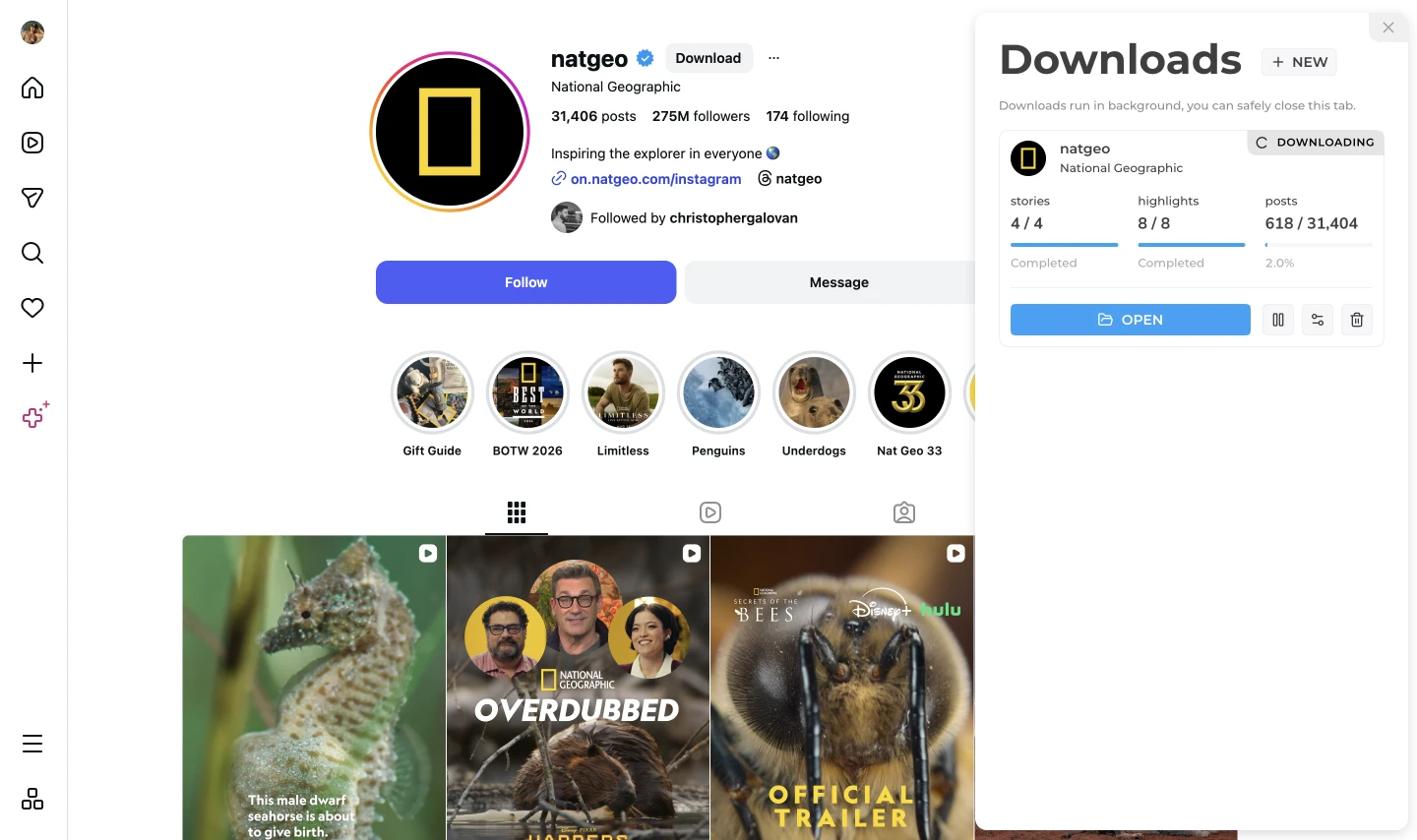
Step 5: Manage Your Downloads
- Pause: Stop downloading temporarily
- Resume: Continue where you left off
- Retry: Restart failed items without re-downloading completed ones
- Edit: Adjust settings mid-download
Step 6: Access Your Downloaded Content
Click Open to view your files. Everything is organized by profile:
Downloads/
└── INSSIST/
    └── @username/
        ├── stories/
        ├── highlights/
        │   ├── Travel/
        │   └── Food/
        ├── posts/
        └── username.json
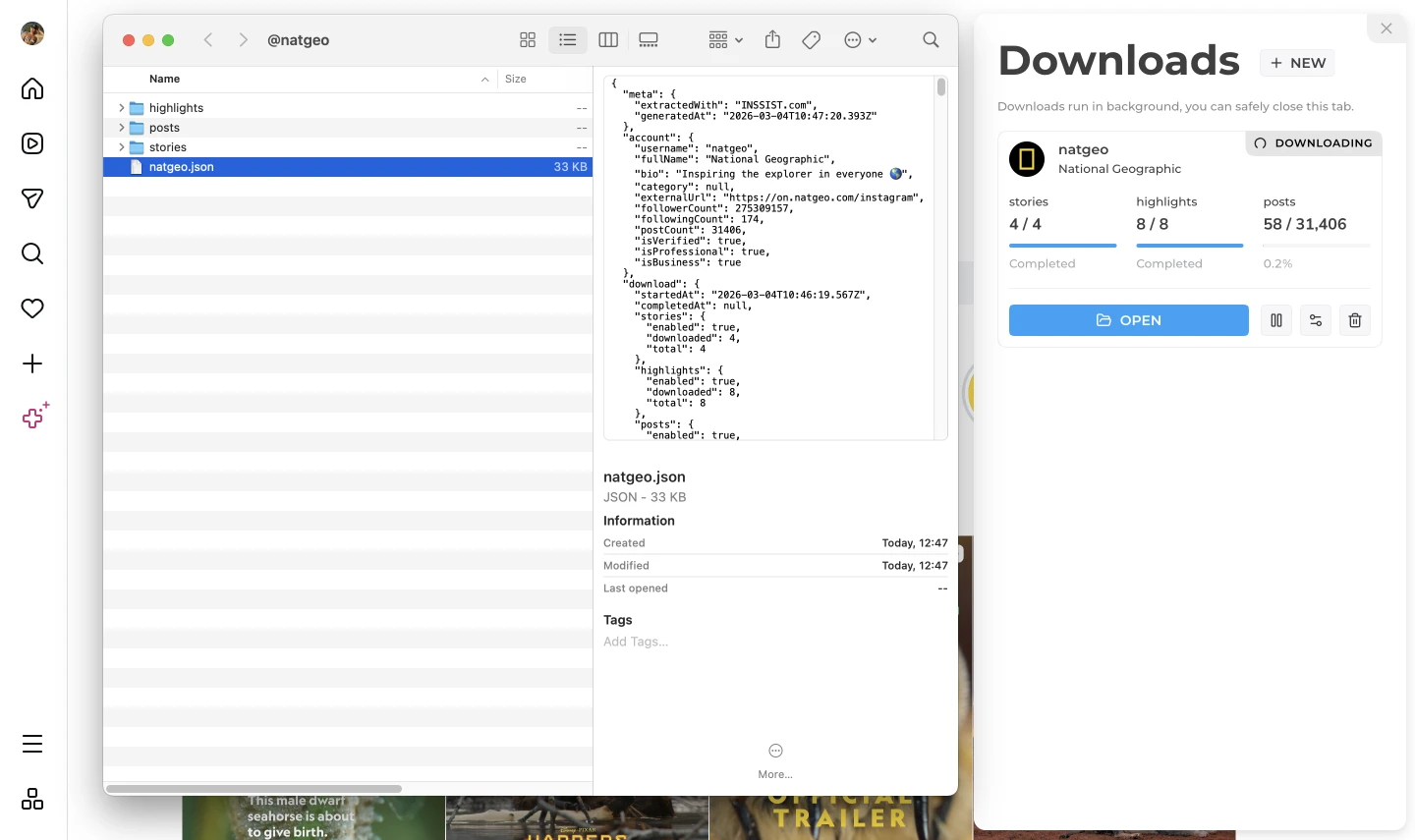
username.json contains valuable insights:
- Account information (bio, follower counts)
- Post engagement stats (likes, comments per post)
- Posting dates and times for content analysis
- Original URLs and captions
This metadata export is invaluable for agencies and marketers analyzing what content performs best.
Save Instagram Stories to Computer Before They Disappear
Instagram Stories expire after 24 hours. INSSIST is an Instagram story saver that captures all active stories in one action:
- Full quality videos with audio
- Photos with filters and effects preserved
- Timestamps in filenames
Bulk Download Instagram Highlights
Highlights are permanent story collections. INSSIST downloads each highlight to its own subfolder, named after the highlight title. Great for understanding how brands organize their key content.
Bulk Download Instagram Posts and Save Instagram Reels
INSSIST downloads posts from newest to oldest. All formats are supported:
- Single photos (JPG, original resolution)
- Videos and Reels (MP4, HD quality - download reels with music, no watermark)
- Carousels (all slides saved with numbering:
#01,#02, etc.)
Managing Multiple Profile Downloads
Need content from several accounts? Start multiple downloads - each runs independently with its own progress tracking. Downloads save to separate folders by username. Perfect for agency workflows or competitor analysis.
FAQ: Instagram Bulk Profile Downloads
How do I download all photos from an Instagram profile?
Install INSSIST, go to Downloads, enter the username, enable "Posts and Reels", and click Download. All content saves to organized folders on your device.
Can I save Instagram stories in bulk?
Yes. INSSIST downloads all active stories (within 24 hours) from any public profile in one click. Save Instagram stories to your computer before they expire.
How do I download Instagram Reels with music?
Enable "Posts and Reels" in INSSIST Downloads. Reels download as MP4 files in HD quality with full audio and music intact, no watermark.
How do I download Instagram highlights?
Enable Highlights in INSSIST Downloads. Each highlight collection saves to its own subfolder.
Does bulk downloading work on private accounts?
INSSIST can only download content you can view. For private accounts, you must be an approved follower.
Is it legal to download Instagram content?
Downloading for personal backup and research is generally permissible. Always respect copyright and credit original creators when reposting.
What file formats does INSSIST save?
Photos save as JPG, videos as MP4. Downloads include a JSON file with account info and post engagement stats.
Can I pause and resume a download?
Yes. INSSIST tracks progress so you can pause anytime and resume without re-downloading completed items.
What's the difference between pin-to-download and bulk profile download?
Pin-to-download lets you save individual posts as you browse - great for curating content from multiple sources. Bulk profile download saves entire profiles at once.
How do I download my own Instagram content?
Enter your own username in INSSIST Downloads. Perfect for backup before making account changes.
Can I download Instagram profile pictures?
INSSIST focuses on downloading posts, stories, highlights, and reels. For profile pictures, right-click the profile image on Instagram and save, or use INSSIST's pin feature on any post showing the profile.
Conclusion
INSSIST makes bulk Instagram downloads simple. Enter a username, select what you want, and get organized files with engagement data - no complicated tools or manual work required.
Ready to start? Install INSSIST and try bulk profile downloads today.
Latest posts
INSSIST & Instagram Insights
Learn Instagram marketing strategies and discover INSSIST features


Hanna Laas
10 Sep 2025

Ethan Campbell
1 Sep 2025

Ethan Campbell
9 Sep 2025

Hanna Laas
1 Aug 2025


Hanna Laas
1 Jul 2025

Ethan Campbell
12 Apr 2026

Supercharge your Instagram
Join over 500,000+ creators growing with INSSIST.