Manage your Instagram Account with Claude Code, Codex or Cursor via MCP Server
The INSSIST MCP server lets an AI agent post, schedule, read DMs and pull analytics inside your own logged-in Instagram session. Works with personal and creator accounts, no credentials shared, everything local.

Ethan Campbell
Published 10 Sep 2026

The INSSIST MCP server lets your AI agent use your Instagram account. Tell Claude Code, Codex, Cursor or Claude Desktop to post a reel, schedule a week of content, reply to DMs or check who unfollowed you, and it does it inside the Instagram you are already logged into. It works with personal accounts, runs on your own computer, and never sees your password.
Setup in 3 Steps
1. Install INSSIST. Add INSSIST to Chrome and open instagram.com, logged in as usual.
2. Add the MCP server to your agent. You need Node.js 22 or newer. The agent downloads and starts the server by itself.
Claude Code:
claude mcp add inssist -- npx -y @inssist/mcp
Codex:
codex mcp add inssist -- npx -y @inssist/mcp
Claude Desktop, Cursor, Windsurf, Gemini CLI or any other MCP client (Claude Desktop: Settings → Developer → Edit Config; Cursor: .cursor/mcp.json):
{ "mcpServers": { "inssist": { "command": "npx", "args": ["-y", "@inssist/mcp"] } } }
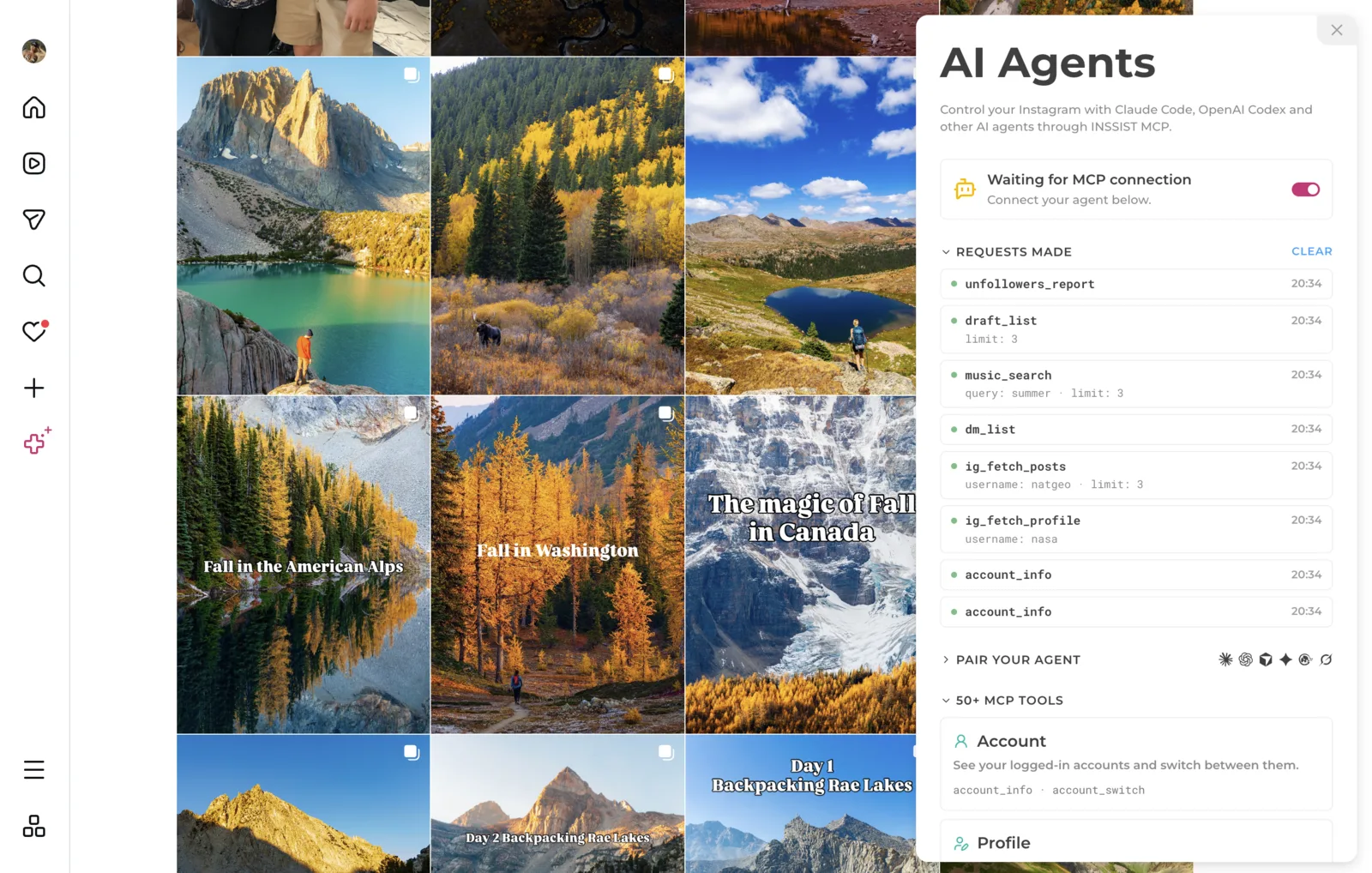
3. Connect the browser. In Chrome, open Instagram, click the INSSIST menu and choose Connect to AI Agents. Turn the toggle on. The panel shows Connected in a few seconds.
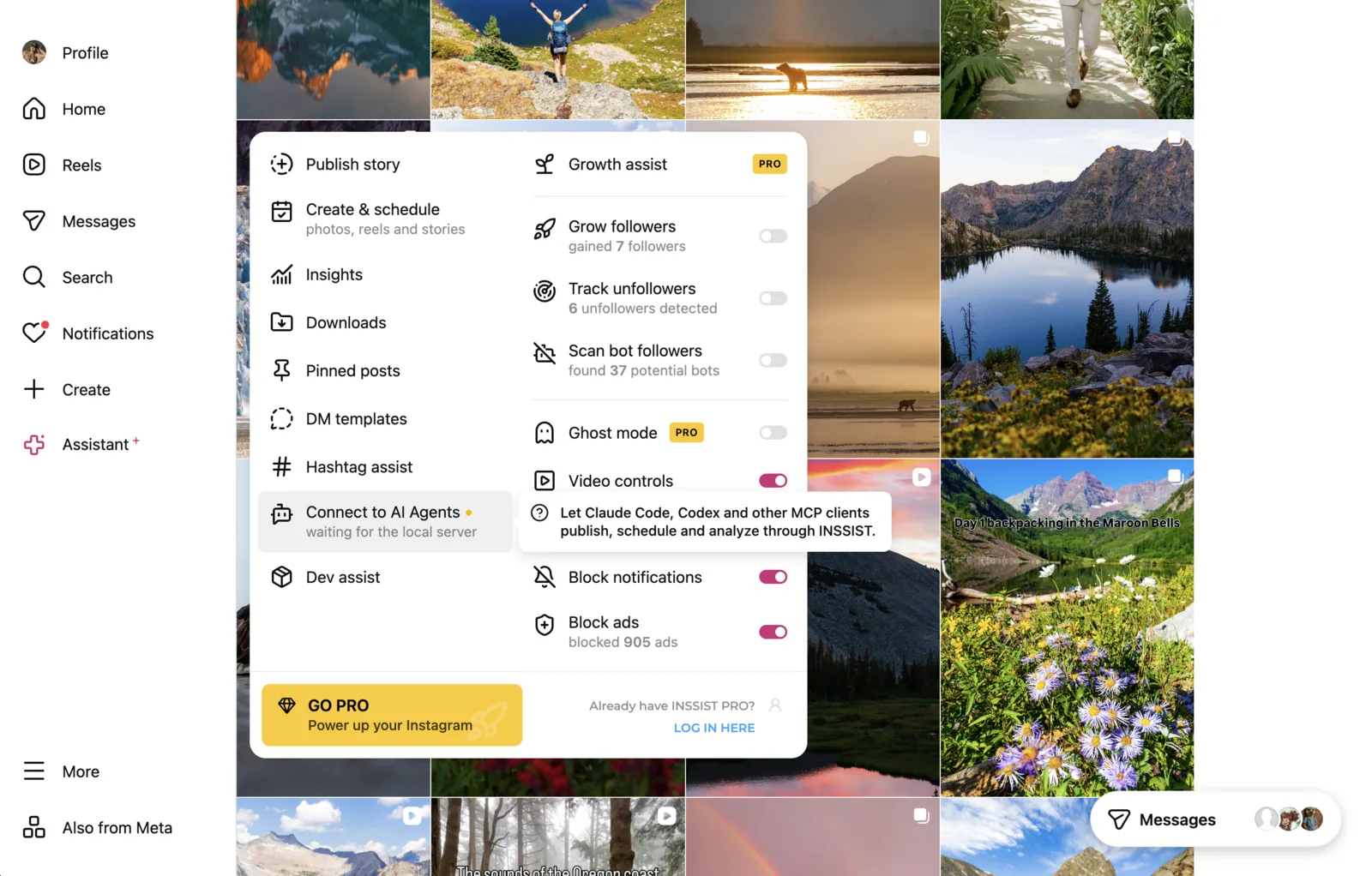
That is the whole setup. The extension and the server remember each other, so next time everything reconnects on its own. Turn the toggle off and the agent is disconnected.
What to Ask
Once the panel says Connected, try these in your agent:
- Who am I on Instagram?
- Reply to my unread DMs in my voice. Show me the drafts before sending.
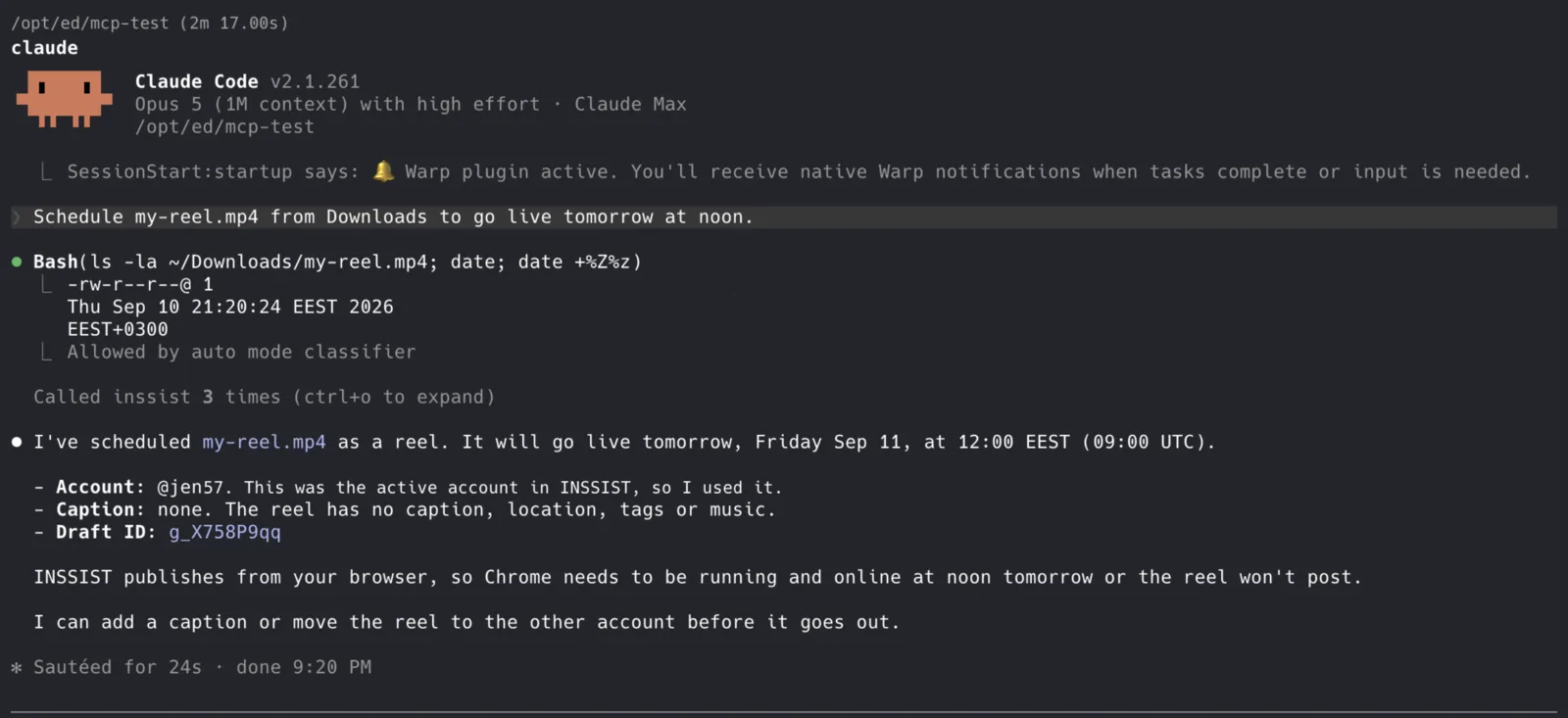
- Schedule ~/Desktop/reel.mp4 for tomorrow at 9am with a caption about spring and a trending track.
- Read the comments on my last post and list the questions people asked.
- Which of my last 30 posts got the most engagement, and what time were they posted?
- Scan my followers for bots.
- Download the last 20 posts from @natgeo to my computer.
- Who followed me in the last 24 hours, and who unfollowed?
What People Use It For
- Plan a week of content in one prompt. Drop your ideas and media files on the agent. It writes the captions, picks tracks from Instagram's music library and schedules every post. You can check the queue in INSSIST's Post Assistant before anything goes out.
- Handle DMs and Comments without opening Instagram. The agent reads new messages and message requests, drafts replies in your tone and sends the ones you approve.
- Get your stats as a sentence. No dashboard. Ask what worked last month and get an answer from your real numbers.
- Clean up your audience. Bot-follower scans and unfollower checks come back as a short summary instead of a list to scroll through.
- Study other accounts. Point the agent at a few creators and have it compare their formats, hooks and posting times.
- Back up your media. Download an account's posts to your computer whenever you want.
Everything the Agent Can Do
58 tools, grouped the same way as INSSIST's own Tools & features panel. Reading is free. Tools marked PRO need INSSIST PRO version.
| Group | What the agent can do | Tier |
|---|---|---|
| Account | See your logged-in accounts and switch between them | Free |
| Read data | Fetch any profile, its posts, one post by URL, live Stories, your saved posts; search accounts, hashtags and places | Free |
| Direct messages | List chats and message requests (free); read a conversation, send a reply, mark as read, accept or decline requests | Free / PRO |
| Publishing | Create drafts from images or video with caption, music, location and mentions; schedule, publish now, edit, reorder and list the queue; search music and locations; edit or delete a live post | PRO (search free) |
| Comments | Read the comments and replies on any post | PRO |
| Engagement | See who viewed a Story, read notifications and pending follow requests | PRO |
| Profile | Update your bio, set or clear a Note | PRO |
| Insights | Engagement metrics, best posting times and audience quality for any account | PRO |
| Audience | Unfollower tracking, bot-follower detection, follower lists, CSV exports | PRO |
| Downloads | Download an account's media or a single post, check progress, cancel | PRO |
Long jobs like insights, audience scans and downloads run in the background and stay visible in INSSIST. The agent starts them with one call and reads the result with another, so the chat never hangs.
How It Works

Your agent talks to a small server that runs on your computer. That server talks to the INSSIST extension in your Chrome. The extension does the actual Instagram work, using the same requests instagram.com makes when you click around yourself.
- Nothing leaves your computer. The server only listens on your own machine and only accepts the extension.
- No passwords. The agent never gets a password, cookie or token. The extension already has your session.
- Human pace. Actions are spaced out a few seconds apart, per account, so an agent firing ten requests at once looks like a person, not a bot.
- One switch. The AI Agents toggle turns the whole thing on and off.
Why Using INSSIST MCP for Instagram
Every other Instagram MCP uses server-driven Graph API, and that comes with three walls: business accounts only, a thin set of features (no Stories with music, no DMs, no follower lists), and media that has to be hosted on a public URL first. Cloud automation tools add a fourth: they keep your account credentials on their servers.
INSSIST is a Chrome extension used by 500,000+ creators to post, schedule and analyze from a desktop browser. It already sits inside your logged-in session. The MCP server just lets an agent use it too. That is why personal accounts work, Stories and DMs work, and nothing is handed to anyone. The only downside of INSSIST being fully local - your Chrome should be running at the time of the scheduled posting for the post to go live.
Privacy
- The server stores one small file,
~/.inssist/mcp-pairings.json, with its own id and a pairing token per browser profile. Nothing else. - The extension sends INSSIST its usual anonymous usage events, including the name of each tool an agent calls, never the arguments or results. See the privacy policy.
- Your MCP client asks before each tool call unless you allow a tool, so you always see what the agent is about to do.
- The server is open source under the MIT license: github.com/inssist/mcp, package @inssist/mcp on npm.
Troubleshooting
- "Failed to start the bridge on 127.0.0.1:48231." Some other program is using that port. Find it with
lsof -nP -i :48231on macOS and Linux, or setINSSIST_MCP_PORTto a free port in your agent's config and in the extension. - The panel stays on "Waiting". The server is not running yet. Most agents start it when you open a session or make the first call. Flip the toggle off and on to reconnect right away.
- The agent says no INSSIST browser is connected. The toggle is off, Instagram is not open in that Chrome profile, or the extension is still connecting. Check that the panel says Connected.
- A message about a protocol version. The extension and the server are out of sync. Update whichever the message names: the extension at
chrome://extensions→ Update, or the server withnpx @inssist/mcp@latest, then restart your agent. - A PRO tool answered with an upgrade link. Expected without a subscription. Reads, search, DM listing and music search stay free.
FAQ
Does this work with a personal Instagram account?
Yes. Personal, creator and business accounts all work, because the agent uses your browser session, not the API.
Which agents are supported?
Anything that speaks MCP: Claude Code, Claude Desktop, Codex, Cursor, Windsurf, Gemini CLI, VS Code with Copilot, and agents you build with the Claude Agent SDK or the OpenAI Agents SDK.
Can it post Stories and Reels with music?
Yes. Drafts can be posts, carousels, reels or stories, with a track from Instagram's music library, a location and mentions.
Can the agent send DMs?
Yes, in existing chats and to accepted message requests. Listing is free; reading and sending need PRO.
Will Instagram block my account?
No tool can promise what Instagram does. The agent works from your own browser and IP, with the same requests the site makes, spaced at a human pace. That is the safest way an automated tool can act on an account.
Do I need a server or a subscription?
No server. The MCP server runs on your computer from npx. INSSIST is free; publishing, DMs, insights, audience tools and downloads need INSSIST PRO.
Can I use several Instagram accounts?
Yes. Switch accounts with one tool, or run several Chrome profiles and address each one separately.
Can I run several agents at the same time?
Yes. Two Claude Code windows, Claude Desktop and Cursor can all be connected at once. They share one connection to INSSIST, so nothing fights over the port.
Is it open source?
The MCP server is MIT-licensed on GitHub. The extension is free on the Chrome Web Store.
Get Started
Install INSSIST, run claude mcp add inssist -- npx -y @inssist/mcp, and turn on Connect to AI Agents in the INSSIST menu. Your agent now works inside your own Instagram, on your own computer.
Latest posts
INSSIST & Instagram Insights
Learn Instagram marketing strategies and discover INSSIST features


Hanna Laas
10 Sep 2025

Ethan Campbell
1 Sep 2025

Ethan Campbell
9 Sep 2025

Hanna Laas
1 Aug 2025


Hanna Laas
1 Jul 2025

Ethan Campbell
12 Apr 2026

Supercharge your Instagram
Join over 500,000+ creators growing with INSSIST.