Instagram Instants: What It Is and How to Turn It Off
Everything you need to know about Instagram's new Instants feature, how to disable it, and how to retract photos you accidentally shared.

Hanna Laas
Published 14 May 2026

On May 13, 2026, Instagram rolled out Instants globally, a new feature designed to bring back the spontaneous, unfiltered photo sharing that defined early Instagram. Within hours, social media was flooded with confused users asking what the mysterious photo stack icon in their inbox was, and how to get rid of it.
What Is Instagram Instants?
Instants is Instagram's take on casual, pressure-free photo sharing. Instead of crafting a polished feed post or a curated Story, you snap a quick photo with one tap and send it directly to selected friends. There are no filters, no gallery uploads, and no heavy editing tools, just a camera, a shutter button, and an optional text caption.
The core idea borrows from several competing apps. Snapchat pioneered disappearing messages. BeReal popularized unfiltered, in-the-moment captures. Locket introduced the concept of sending photos directly to a close circle. Instants combines elements from all three into a single feature embedded within Instagram's existing messaging infrastructure.
Key characteristics of Instants:
- One-tap capture: Opens directly to the camera with no editing suite
- Disappearing for recipients: Each Instant can only be viewed once, then it vanishes
- Private archive for senders: Your sent Instants are saved in a personal archive visible only to you, stored for up to one year
- Close circle sharing: Recipients are limited to your Close Friends list or mutual followers
- No screenshots: Instagram actively blocks screenshots and screen recordings while viewing an Instant
Meta positions the feature as a response to declining casual sharing on the platform. As feeds became dominated by professional content and algorithmic recommendations, private, low-stakes sharing migrated to competitors. Instants is an attempt to reclaim that territory.
How Instants Works
Sending an Instant
- Open the Instagram app and navigate to your DM inbox
- Tap the photo stack icon in the bottom-right corner to open the Instants camera
- Snap a photo with one tap (no camera roll uploads in the current version)
- Optionally add a text caption
- Choose your recipients: your Close Friends list or mutual followers (people you follow who follow you back)
- Tap Send
An Undo button appears briefly after sending, giving you a narrow window to retract the photo before anyone opens it.
Receiving an Instant
When someone sends you an Instant, a small photo stack appears in the bottom-right corner of your inbox. Tap it to view. The photo displays once, then disappears from your view. You can:
- React with an emoji
- Reply, which opens a regular DM thread
- Send an Instant back
Unopened Instants expire after 24 hours. If you never tap the stack, the photo simply disappears.
The Private Archive
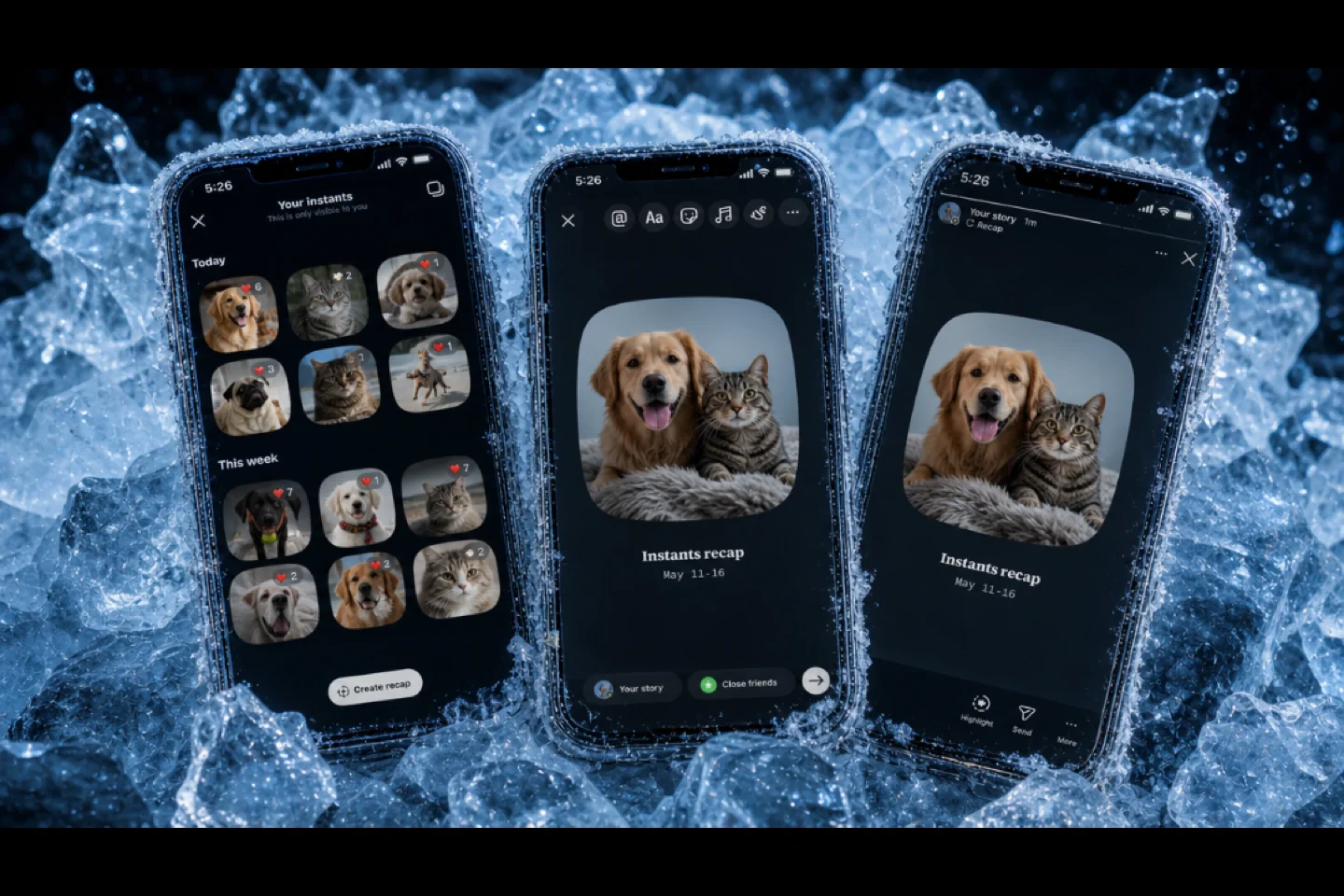
Every Instant you send is automatically saved to a private archive that only you can see. Access it via the archive icon (typically top-right in the Instants view). Photos remain in the archive for up to one year. You can also compile recent Instants into a "recap" and reshare it as an Instagram Story for your broader audience.
The Standalone App
In select regions, Instagram offers a dedicated Instants app that opens directly to the camera for faster access. It uses your Instagram login, and all content syncs between the standalone app and the main Instagram app seamlessly.
How to Turn Off Instagram Instants
Instagram does not offer a single "disable" toggle, but there are several ways to remove the feature from your experience.
Hide Instants From Your Inbox (Recommended)
This is the most effective way to remove Instants entirely from your view:
- Go to your Profile and tap the menu (three lines, top right)
- Select Settings and activity
- Navigate to Content Preferences
- Toggle on "Hide Instants in Inbox"
This removes the photo stack icon from your inbox completely. You will no longer see Instants sent to you.
Temporarily Snooze Instants
If you want a quick break without changing settings:
- In your inbox, tap and hold the Instants photo stack
- Swipe right to hide it temporarily
- To restore it later, swipe left on the same spot or tap and hold again
Reduce Instants Notifications
To keep the feature available but silence the alerts:
- Go to Settings > Notifications (or Push Notifications)
- Adjust notification preferences to "Messages only" or disable Instants-specific alerts
Block Specific Senders
If you only want to stop receiving Instants from certain people, use Instagram's existing tools:
- Mute the account to stop seeing their Instants without unfollowing
- Restrict the account to limit their ability to interact with you
- Block the account to cut off all communication
How to Retract Photos You Accidentally Shared
Accidental shares are one of the most common complaints about Instants. Some users have inadvertently sent photos to their entire mutual followers list instead of a single person, not realizing the default recipient scope. Here is how to undo the damage.
Use the Undo Button (Immediately After Sending)
Right after you send an Instant, an Undo button appears on screen for a few seconds. Tap it immediately to retract the photo before any recipients open it. This is the fastest and most reliable method.
Delete From Your Archive (Before It's Opened)
If you missed the Undo window but the recipient has not opened the Instant yet:
- Open your private Instants archive
- Find the Instant you want to retract
- Delete it
Deleting from the archive unsends the photo for recipients who have not yet viewed it. You can also delete any Instant from the archive at any time to remove it from your personal history.
The Hard Truth About Viewed Instants
Once a recipient has opened your Instant, they have already seen it. The photo disappears from their view after one viewing, but the image was displayed on their screen. No retraction can undo that. This is why double-checking your recipient list before tapping Send is critical.
Privacy and Safety Considerations
Built-In Protections
Instagram has implemented several privacy measures for Instants:
- Screenshot and screen recording blocking is enforced at the app level while viewing an Instant
- Recipient restrictions limit sharing to Close Friends and mutual followers only
- Standard safety tools (block, mute, restrict, report) apply to Instants just as they do to DMs
- Community Standards enforcement with automated detection technology
Teen Account Protections
For users under 18 with Teen Accounts, additional safeguards apply automatically:
- Time spent on Instants counts toward daily Instagram usage limits
- Sleep Mode mutes Instants notifications during configured hours (e.g., 10 PM to 7 AM)
- Parents receive a notification when their teen first downloads the standalone Instants app
- Family Center parental controls extend to the Instants feature
Limitations to Be Aware Of
No ephemeral messaging system is fully leak-proof. While Instagram blocks in-app screenshots, determined users can capture content using a second device, an external camera, or screen mirroring workarounds. The screenshot restriction is an app-level enforcement, not a physical impossibility.
Your archived Instants are stored on Meta's servers for up to one year. This means Meta retains copies of every photo you send through the feature, even after it disappears for recipients. Users with concerns about Meta's data practices should factor this into their decision to use the feature.
Early user reports also highlight the risk of accidental broad sharing. The recipient selection interface defaults to your full mutual followers list rather than individual contacts, which has led to embarrassing mass sends. Always verify who you are sending to before tapping the shutter button.
Early User Reactions
Reactions to Instants are mixed. Some users enjoy seeing unfiltered daily moments from friends, finding it reminiscent of early Instagram before the platform became dominated by polished content and sponsored posts. Casual use within close friend groups and family circles has been well received.
Others have been less enthusiastic. Common complaints include the inbox icon feeling intrusive, the risk of accidental sends, and unwanted or explicit content arriving from mutual followers. Tutorials explaining how to hide the feature have gone viral, suggesting a significant portion of users prefer Instagram without it.
The broader sentiment positions Instants as Meta's competitive response to Snapchat and TikTok for younger demographics. Whether it gains long-term traction or follows the path of earlier Instagram experiments remains to be seen.
Latest posts
INSSIST & Instagram Insights
Learn Instagram marketing strategies and discover INSSIST features

Hanna Laas
10 Sep 2025


Ethan Campbell
1 Sep 2025

Ethan Campbell
9 Sep 2025

Hanna Laas
1 Aug 2025


Hanna Laas
1 Jul 2025

Ethan Campbell
12 Apr 2026

Supercharge your Instagram
Join over 500,000+ creators growing with INSSIST.